Weekly Log

Weekly Log 4 – Premier Pro Video Highlights

Context

During this week we began with learning basic video editing highlights for football matches, understanding the importance of following a style guide and applying basic edits. We layed it out as a kick off, goals and full time style in the edit. We also wanted to aim this towards people aged 15-35 with a male skew towards it, making sure to maintain fast paced gameplay and yet maintaing the story of each moment in the match. The match we edited was a single camera game with the U21 Manchester United VS Barnsley in the 23/24 season .


Research

Story

For this we wanted to include all notable moments in the game being the kickoff, all the goals and the full time whistle. This is too maintain an entertaining watch for the view featuring all of the crowd noise and celebrations too to entertain.

Stylistic

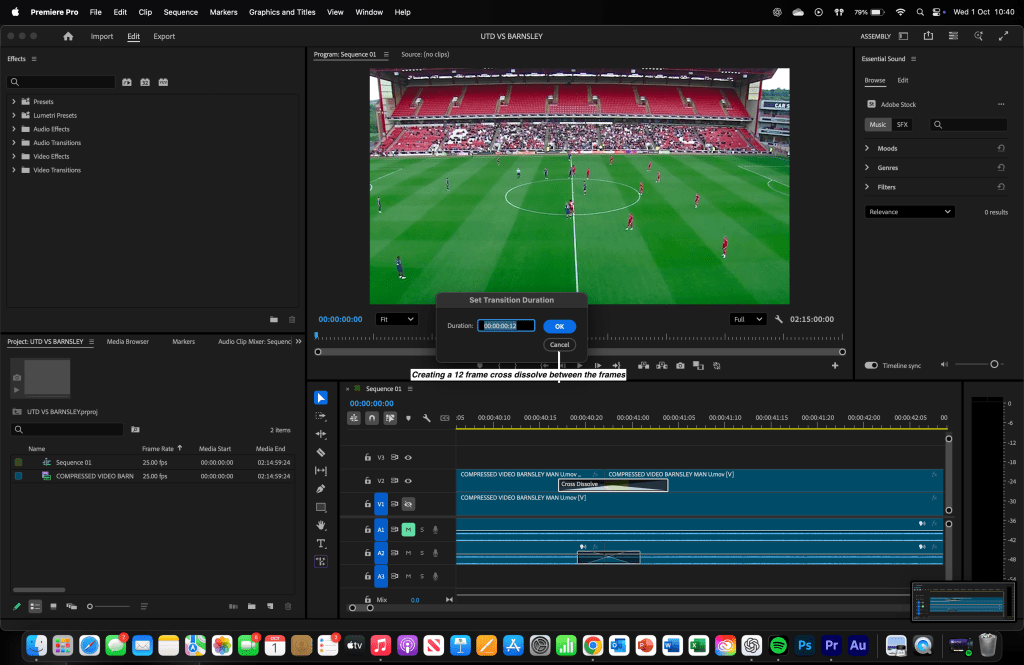
We wanted to create a short fast paced edit with short and sharp cuts following the style guide making sure to include a 12 frame cross dissolve between each replay. We wanted to match the idea of some channels like the Official Sky Sports Premier League channel.

Technical
I researched various hardware options suitable for audio editing in Adobe Audition. I currently use a MacBook Pro M2, which provides more than enough power to run the software effectively. For the software itself, I chose Adobe Premier Pro over alternatives because it allows me to take simple ideas and develop them into polished, high quality video edits.


Practical Skills

We learned the basic skills on premier pro understanding how to make a 12 frame cross dissolve to create an engaging seamless transition between each of the goals and such. Ensuring to include the crowd noise and celebrations to make sure it is even more entertaining.


Evaluation and Reflection

What Went Well (WWW)

  • Being able to edit the highlights in quick succession.
  • Understanding the 12 frame cross dissolve efficiently and applying it to the edit.
  • Maintaining a clear structure (kickoff, goals and full time.)

Even Better If (EBI)

  • More variety in camera angles – Using additional camera shots would have made the highlights more dynamic and visually interesting.
  • Quick Succession – Completing the edit more faster than before.
  • Refinement of transitions – Possibly smoother or more creative transitions could enhance the overall polish of the edit.

Below is all of the platformed videos


Weekly Log 3 – Understanding Audition

Context

During this week we focused on the same concept of creating highlights packages for people aged 15-45 with a male skew towards it showing the kickoff, goals and full time. I worked on the Chelsea vs Brighton pre season game and I also worked on my speed with some champions league games like Juventus against Dortmund.

We also had a Classic FM day and for this we created a 2-3:30 long highlights package featuring the best pieces of commentary from the champions league. with classical music in the background tailored for people aged around, 35-50 again with a male skew and for people to listen to classical music.


Research

Story

Again I wanted to represent the interesting moments in the game being the kickoff, goals and full time whistle. This is all because it would become an engaging story for the viewer to engage with and gage a full picture of the game without having to watch the entire match.

For the Classic FM day, featuring all of the most entertaining pieces of commentary, The story I wanted to tell was more to engage the listener and for them to be entertained by the champions league music and the commentary coupled with showing all of the most notable moments from the Champions League match week 1 .


Stylistic

The style I wanted to create for this highlight package was to be short and sharp and only feature goals within it and to be around 2-3 mins long. Typically channels like the Official Sky Sports Premier League channel. More similar to the 4-4 Juventus vs Dortmund game shown below from TNT sports.

What I wanted to create for the classic FM highlight reel was to feature the match week 1 story and also represent the most notable moments of commentary from there. This can be shown here. Or with the video below.


Technical

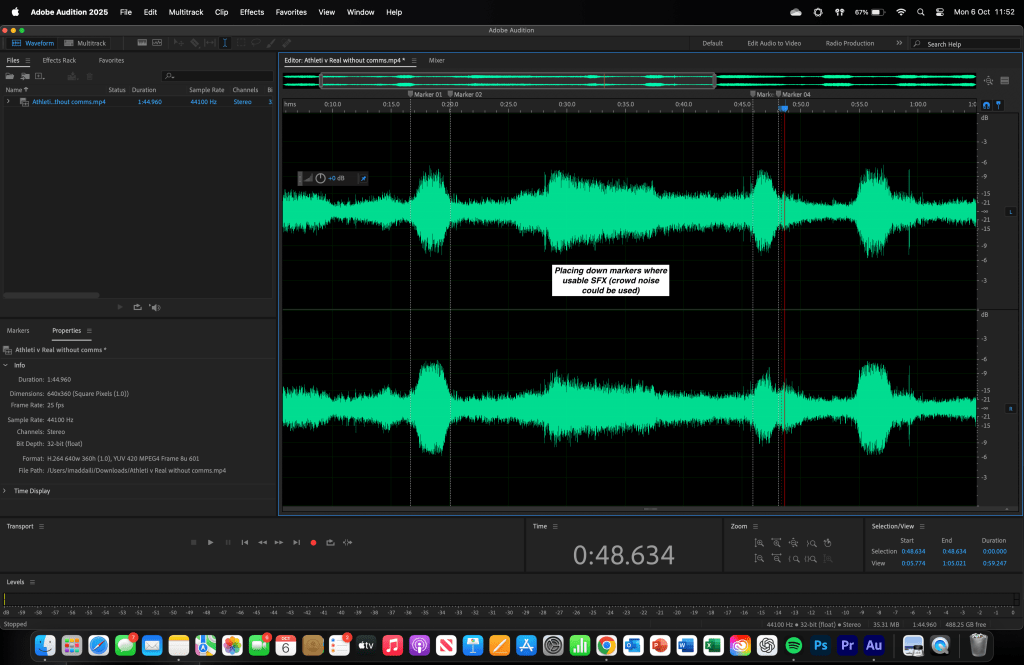
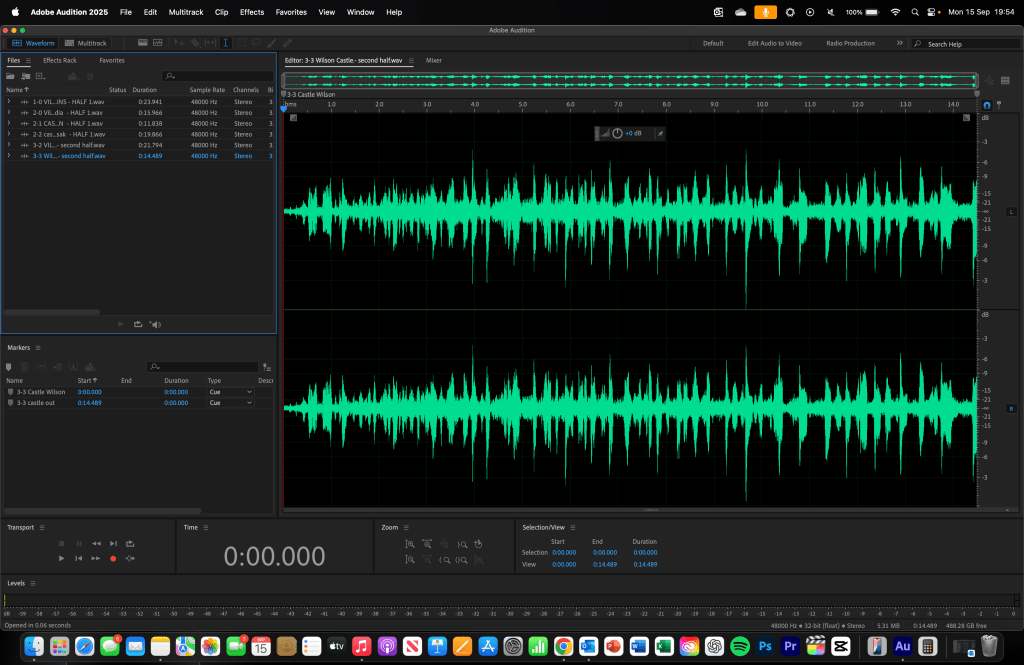
I researched different pieces of hardware that were suitable for audio editing on Adobe Audition. I have access to a Macbook Pro M2 which is more than enough for adobe audition. In terms of software I used audition in comparison to others as it allows to build on basic ideas and to develop them into great audio clips.


Practical Skills


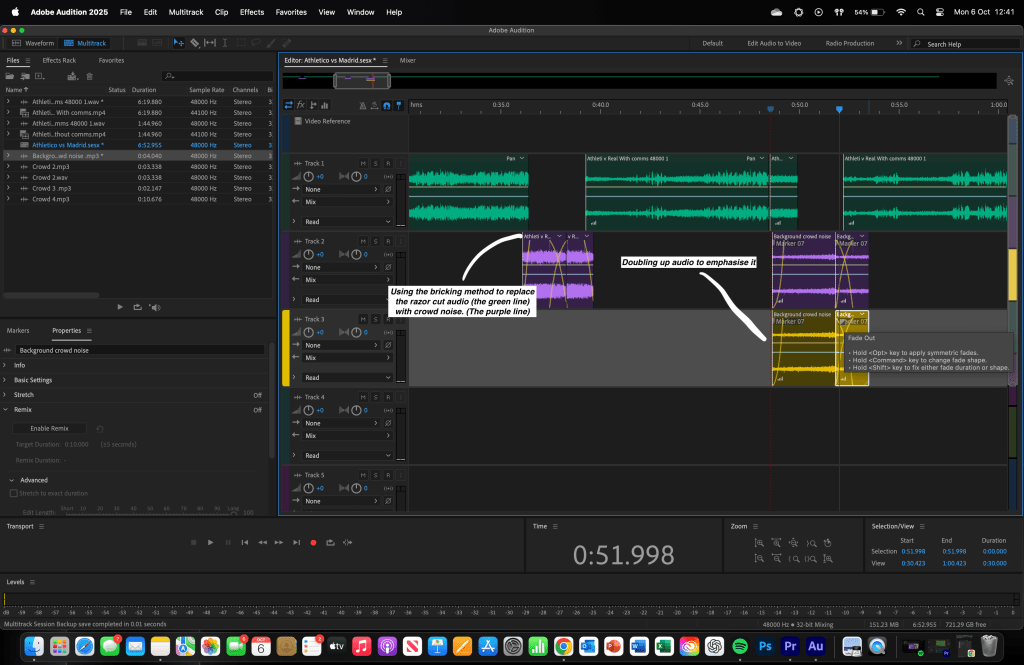
We made use of several tools in Audition, but the ones we relied on most were the fade-in and fade-out features. These allowed us to create a seamless final package that flowed smoothly and kept the audio engaging for listeners. This directly tied into our target audience, as it helped us produce a fast-paced, captivating highlight reel. In addition, I worked in a multitrack session to incorporate and edit the music, ensuring it fit perfectly with the overall piece.


Evaluation and Reflection

What Went Well (WWW)

  • Being able to edit the highlights in quick succession.
  • Utilising the remix tool instead of looping the music manually.
  • Overlapping 2 pieces of commentary over each other to create a seamless package.

Even Better If (EBI)

  • It would’ve been better if I made the Classic FM highlight package more quickly with more quality.
  • It would’ve been better to save all of my individual packages as a MP3 to save space on my laptop.
  • It would’ve been easier to shorten down the commentary length in some places to only tell the main story of the goal.

Below is the platformed audio clips

Weekly Log 2 – Adobe Audition

Context

This week I began creating a highlight package of a kickoff, goals and full time for a friendly premier league game in the 23/24 season with Newcastle UTD vs Aston Villa in a preseason tournament. I wanted to target this piece towards peopled aged 15 – 45 with a thorough interest in football with a male skew towards it. We created this highlight package on adobe audition using different tools that it has to offer. With a final product to platform it on Spotify for creators.


Research

Story

The story I wanted to tell was to be similar to a highlight package made by the premier league for example: here. Featuring all notable moments in the game typically, kick off, goals and the full time whistle. This is because it will create and engaging story for the viewer for them to have an interest in.


Stylistic

The style I wanted to create for this highlight package was to be short and sharp and only feature goals within it and to be around 2-3 mins long. Typically channels like the Offical Sky Sports Premier League channel. More similar to this video shown below:


Technical

I researched different pieces of hardware that were suitable for audio editing on Adobe Audition. I have access to a Macbook Pro M2 which is more than enough for adobe audition. In terms of software I used audition in comparison to others as it allows to build on basic ideas and to develop them into great audio clips.


What

The research I conducted for my age range was firstly finding out that making a very fast paced highlight package was imperative to keep the younger generation engaged whilst also understanding to understanding to balance it out with enough information to keep an older generation engaged. We researched the specific match that was played and gathered all the accurate information available to us. Alongside this, we studied different editing styles used in official Premier League highlight packages to better understand the elements that make an audio highlight package sound professional. Furthermore, we fully researched different audio editing tools such as, Logic pro x (which is more tailored towards music editing) and adobe audition which is the one that we used. We used Audition as it allows to understand the basics and to build on them with more complex features.


Why

This research allowed us to develop practical editing skills, such as using the fade in and fade out tools within the favourites tab. It also deepened our understanding of why audio only highlight packages are created. We learned that a commentator can effectively capture the story of a goal within a short 15-second clip, making the entire match concise and engaging to listen to.


Practical Skills

We used different tools in audition that we had at our disposal however the one we used the most was most definitely the fade out and fade in tools making sure the final package became a seamless audio file that became engaging for people to listen too. Which linked too the target audience we wanted to target as it assists to create a engaging fast pace highlight reel. I also used a multitrack session to add in and edit the music that we could use as well.


Evaluation and Reflection

What Went Well (WWW)

  • It became easy to understand where and how to find the kick off and all the goals that happened during the game.
  • It was easy to understand how to make a seamless package that was engaging for the listener.
  • Looping specific parts of the music was a good idea as the most impactful moments were coupled with impactful music too.

Even Better If (EBI)

  • It would’ve been even better if I made the package more complicated by adding in different things that happened during the game to fully en-capture the entire story of the match.
  • It could’ve been even better to blend the audio files in even more with the music to get everything 100% aligned.
  • Creating the edit in a shorter amount of time with the same amount if not more quality.

Below is the final platformed product shown.

Weekly log 1 – Word Press

Context

During this week I have been busy creating my wordpress website adding different features making sure to showcase my previous work and anything else I am working on, along with my final major project (FMP.) Adding different pages for example this weekly log and making it a blog post page. I also wanted to bear in mind that I wanted to target an audience for this website of people as likeminded as me tailoring my website directly towards the media industry.


Research

Technical

We explored a range of website hosting platforms to find the most suitable place to showcase our work. After comparing different options, we chose WordPress because it is user-friendly, highly flexible, and does not restrict creativity. It allowed us to build and customise our site freely, without running into issues around copyright or usage limitations.

Stylistic

Our goal was to create a professional and accessible platform where our projects could be presented clearly and effectively. WordPress gave us the freedom to design and manage our content in a way that reflected our vision, while also offering reliability, scalability, and a strong support community. This made it the best choice for ensuring our work reaches the widest possible audience.


Practical Skills

WordPress was a difficult website to use however getting the grasp of it became simpler over time and easier to understand. I utilised many different tools the website has to offer. The one I used the most was most definitely adding a video using a YouTube link which organised everything and made it much more neater.

Furthermore, making sure the pages were hyperlinked with the buttons was also a skill I had to learn as well, I also began to add all of the menus etc.


Evaluation and Reflection

What Went Well (WWW)

  • Successfully creating a presentable portfolio page.
  • Understanding how to present the website as a whole in a neat and orderly manner
  • Adding videos and images correctly and in the main point.

Even Better If (EBI)

  • Could be better if I was able to hyperlink the weekly log page to make it more presentable.
  • Making sure to understand the full capability of how the menus work and how to organise them effectively.
  • Ensuring I utilise more complex blocks that will make a more engaging website rather than a wall of words.

Introduction – Imad Daili

In this section of the website I will be detailing every aspect of my process of different works I do. Such as my upcoming FMP in year 12 and any other tasks or personal endeavours I could take up.

In every single weekly log I create I will follow 4 main criteria being: Context, Research, Practical Skills, Evaluation and reflection. In all of these sub-sections I will be detailing my reasoning and such for my work.

If you would like to know more about me click here, alternatively if you would like to contact me in any way and find out more about what I have done and how I did it, click here.