
Context
For this week we began and finished the Staines rugby team highlights package, with graphics at the beginning and the end. The goal was to summuraise the story of the game in an efficient manner, this was showing: kick off, tries and conversions in between, half time and full time whistles. This was to target generally male audiences around 11-35 who are interested in their local rugby club games. The specific game that we edited was the Staines rugby team vs Farnbourgh.
Research
Technical
We did this piece on Adobe Priemere Pro as it is generally the industry standard to edit highlights packages on, we also researched different editing applications such as final cut pro which we could not use due to its exclusivity to apple branded products, and divinci resolve. We settled on Adobe Priemere Pro as we had already been familliar with the application.
Story
I interpreted the brief was too ensure that the highlights pacakge told the story without showing the entire game, this meant identifying the moments that were necessary for the audience to understand.
I prioristised the kick off, tries and conversions with the half time and full time shistles, while removing the sections where there was little or no action what so ever as it was not important. I also made sure I did not cut too quickly after important moments allowing the audience enough time to understand what had happened.
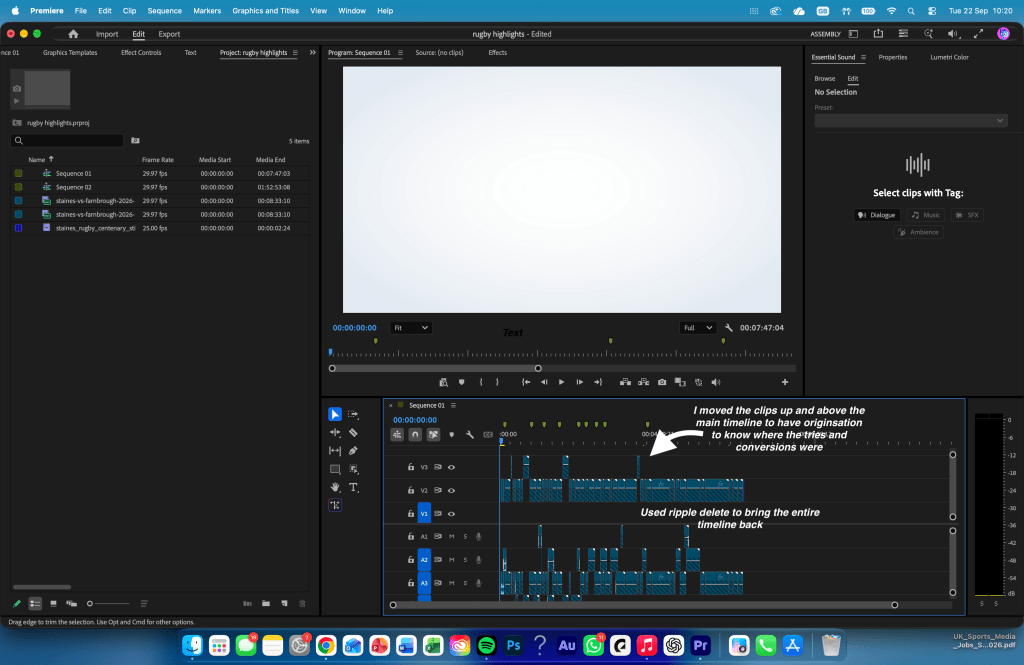
To orginise this I placed markers on the timeline and temporarily moved clips to the higher tracks to orginise my self and complete the work in an efficient manner. Once I had selected the clips I used the ripple delete function to close the gaps.
Stylistic
My idea for this piece of work was to complete a fast paced highlight reel but also ensure how natural it feels, the inspiration mainly the Sky Sports Rugby highlights which easily show the kick off, half time and full time whistles with tries and conversions in between.
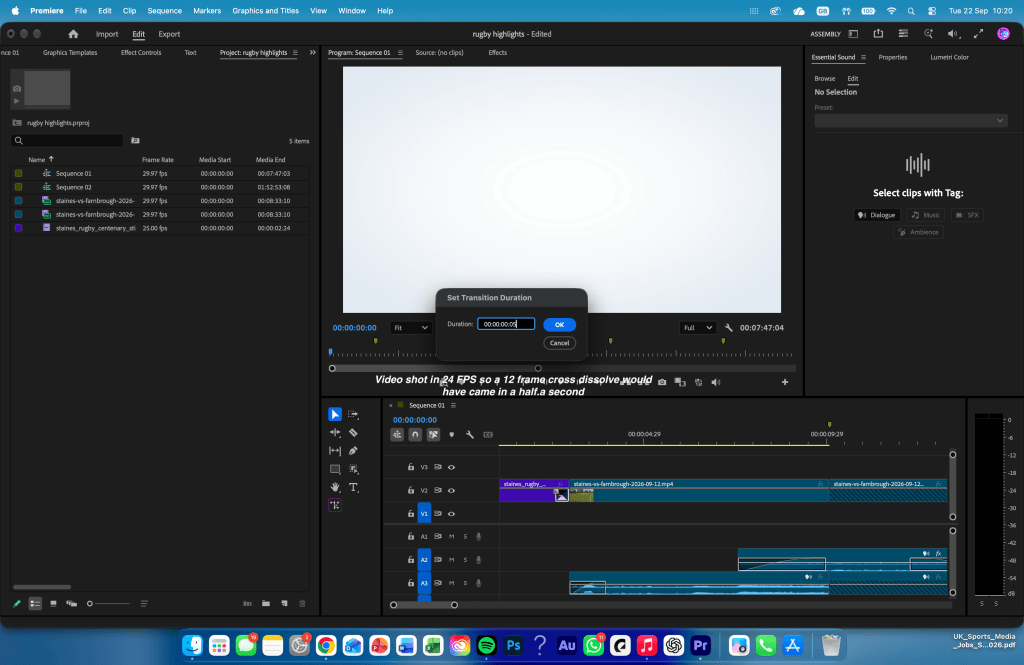
When showing a try and moving onto the replay I used a 12 drame cross dissolve as detailed in the style guide, the match was shot in 24 FPS so a 12 frame criss dissolve would have been a dissolve lasting half a second between the replay and the main highlight
I also used graphics at the beginning and end of the package to give the edit a clearer introduction and conclusion and make it feel more like a complete highlights package rather than simply a collection of clips.
Problem Solving
- Problem: I used cross dissolves on every transition
Solution: Got rid of the majority of them and ensured that the only cross dissolve was between a try and a replay. - Problem: Removing large sections of footage created gaps in the timeline
Solution: I used the ripple delete function to remove the empty space and bringing them together - Problem: Some cuts in some sections felt too sudden
Solution: I prioritised the main events such as kick-off, tries, conversions, half-time and full-time so the audience could still understand the progression of the game.
Evaluation and Reflection
What Went Well (WWW)
- I successfully condensed a much longer rugby match into a shorter highlights package while still maintaining the main story and progression of the game.
- I improved my organisation within Adobe Premiere Pro, particularly through using markers, multiple tracks and ripple delete to manage a large amount of footage.
- I also became more intentional with my editing decisions, such as considering the frame rate when setting transition durations rather than adding transitions without thinking about their exact timing.
Even Better If (EBI)
- I could mark all of the tries, conversions and other important moments before beginning the main edit, which would make the editing process quicker and more organised.
- I could experiment with more sports-specific graphics, such as score updates or try graphics, to give the package more information visually.
- I could also improve the pacing further by reviewing the finished package multiple times and identifying any sections that could be shortened without removing important context.

 Imad Daili - Sports Media