Week 18 – Continuing Heinz Beans Pitch

Context

In this project we were tasked with assisting with the promotion of the flavoured Heinz Beanz product. The aim was to target this product towards a younger audience range of around 18–34 year olds, with no specific gender skew.

Our main idea that we settled on was to create parody movie trailers or famous movie scenes and rebrand them to be Heinz related. For example, the famous red pill / blue pill scene from The Matrix would instead feature two different Heinz bean flavours.

During this week, we focused mainly on developing the pitch presentation and refining the campaign concept, including creating visuals and thinking about how the campaign would be distributed and measured.

Research

During this week we researched how film parody advertising campaigns work and why they are effective for younger audiences. Younger audiences often engage more with recognisable pop culture references, especially when they are humorous or unexpected.

We also looked into how social media engagement and shareability plays a role in advertising success. Platforms such as TikTok, Instagram and YouTube Shorts would allow the campaign clips to be easily shared and reposted, helping the idea spread organically.

We also included research and data within our presentation to support the claim that short-form, entertaining content performs well with the 18–34 demographic, making this concept suitable for the product.

Story

The goal of the campaign is to create recognisable, entertaining and shareable movie scene parodies that promote the new Heinz flavoured Beanz range.

These scenes would recreate iconic moments from popular films but with a humorous Heinz twist. For example:

  • A Mission Impossible style scene where someone attempts to steal a rare tin of flavoured Beanz
  • A Breaking Bad parody where the new bean flavours replace the original product
  • A Hunger Games style visual where competitors fight over different flavours

These scenes would be turned into short trailers, social media clips and billboard visuals, helping the product feel more culturally relevant to younger audiences.

We developed our main presentation format this week which outlines the campaign concept, target audience, distribution platforms and how success would be measured.

Pitch deck:


Stylistic

Our main stylistic inspiration came from parody advertisements that recreate famous scenes but rewrite the dialogue and product placement to promote a brand.

One key example was this Breaking Bad parody advert, where the famous scene was recreated and rewritten to promote the snack product. The humour and recognisability of the scene made the advertisement entertaining while still clearly showcasing the product.

This approach inspired us to ensure that our parody scenes would still feel recognisable, but rewritten to highlight the Heinz Beanz flavours in a humorous way.

Technical

Since this project is primarily a pitch concept rather than a produced advertisement, we did not use technical filming equipment.

However, we did use several digital tools to develop the campaign idea including:

  • Canva for creating the pitch deck and visual campaign examples
  • Image editing tools to create mock billboard concepts and visuals
  • Online research sources to gather marketing data and audience insights

These tools helped us visually communicate how the campaign would look if it were produced.

Practical Skills

This week we focused on turning our core idea into a structured pitch presentation.

We expanded on the original mind map and developed a clear slide-by-slide presentation, including:

  • The campaign concept
  • Target audience
  • Advertising platforms
  • Visual examples of the parody scenes
  • How success would be measured (sales increases, engagement and shares)

We also created mock visuals such as billboards and promotional images, which helped bring the concept to life and made the pitch more engaging.

WWW (What Went Well)

1. The concept was developed further

This week we were able to expand the original parody idea into multiple scene concepts and campaign visuals, making the idea feel more realistic and achievable.

2. The presentation became much clearer

We organised the pitch deck so that the campaign idea, audience and marketing strategy were clearly explained, which helped make the overall concept easier to understand.

3. Strong visual examples

Creating mock visuals and parody examples helped demonstrate exactly how the campaign would look in real life, making the pitch more engaging.


EBI (Even Better If)

1. More time for refining visuals

Although we created several visual examples, having more time would allow us to improve the designs further and create additional scene ideas.

2. More detailed audience research

While we did research the 18–34 demographic, it could be improved by including more detailed statistics or consumer behaviour data.

3. Testing the idea with a small audience

It would have been useful to gather feedback from a small focus group within the target audience to see how they react to the parody concept before pitching it.
Week 17 – Starting our pitch


Context

In this project we were tasked with assisting with the promotion off the flavoured Heinz beanz product. The aim was to target this product too a younger audience range to around 18 – 34 year olds with no real gender skew at it.

Our main idea thart we settled with was to create a parody movie trailer/famous movie scene and rebrand it to be heinz related. For example the matrix red pill blue pill scene is 2 different bean flavours.

Research

Story

As stated previously the goal here was to create a recognisable, entertaining and shareable movie scene rebranded (without infringing on copyright laws) to engage viewers and make the heinz beanz flavours more noticed in the wider markert, more in with the younger generation.

We did this by laying out our main presentation format of what we would be doing and how will be doing it. Coupled with our data as well

Stylistic

Our main inspiration for this would be this scene recreation by poppers using a famous scene from breaking bad, which is linked below. The product placement is everywhere and also the wording of the scene was accuratley rewritten to show how great the poppers where to show them to be an excellent choice for a snack

Technical

In terms of this wider project we would not use any technical equipment as we are just presenting an idea to heinz as the company.

Practical Skills

We started by creating a mindmap of our ideas to do with the film parody idea which is shown below to accuratley represent all of our ideas on one paper. We then represented the broader ideas all on a presentation powerpoint shown above as well. This in turn helped lay out ideas in a great presentation and effectivley too.

WWW (What Went Well)

1. The planning

We collected all of the neccacey data, gender skews, age ranges and focus groups to accuratley determine whether this idea would be good or not.

2. We presented our ideas effectivley and effeicently

Using the mindmap really helped out lay out our main ideas for this project.

3. The main idea was unique but useful.

The main idea of a film parody really helps in the sense that it would create for a recognisable yet enetertaing advertisment that could also be shareable causing the general target audience to talk about it as well.

EBI (Even Better If)

1. Timings

It could’ve been better of we made our ideas and oresentations much more quicker as we would have more time to think about what the presentation looms like rather than worry about all of the info.

2. Maybe a better idea could’ve been selected

We also discussed having a cook off showcasing different styles of cooking with the flavoured baked beanz however we settled on the film parody.

3. Stronger audience alignment

Maybe a wider audience age range could have been selected to have a broader reach within the younger age range

Week 16 – Final Evaluation

Framing and Composition

The framing of the interview largely follows the rule of thirds, with the subject positioned slightly off-centre rather than directly in the middle. The eyeline sits near the upper third of the frame, which keeps the audience visually engaged. As spoken about in the 4 essentials video linked below.

Headroom is controlled effectively. The subject does not appear cramped at the top of the frame, and there is enough space above the head to maintain balance without creating excessive negative space.

The framing feels balanced in relation to the mannequins placed within the set. The mannequins act as visual anchors on either side, preventing the shot from feeling empty while reinforcing the sports theme.

There are no major examples of distracting “background growth” (e.g., objects appearing to come out of the subject’s head). The background elements are positioned slightly off-axis to maintain clean separation.


Lighting and Contrast

The lighting, which was mainly the pixapro flood light, was adapted to create separation between the subject and the props and to also evenly light the subject in place to even out the enviorment and make for a nice, clean and professional set.

Exposure is well managed. The fabrics of the kits for example in the one person shoot video retain visible texture and detail, rather than appearing blown out or overly dark. Skin tones remain natural, which supports the professional aesthetic.

Shadows are controlled carefully. While there is enough shadow to create dimension, they do not obscure the interviewee’s face. The face remains the brightest and most visually dominant element in the frame, ensuring audience focus stays where intended.


Scene Dressing and Depth

The mannequins are placed strategically to create layered depth. There is a clear foreground (interviewer framing), mid-ground (interviewee), and background (sports kits/mannequins). This layering gives the shot a three-dimensional feel.

The sports kits are clearly visible, immediately communicating the sports interview theme. This supports audience understanding without requiring verbal explanation.

The set dressing appears organised and deliberate rather than cluttered. Each prop serves a purpose, contributing to brand identity and reinforcing the sporting context.

The subject is physically separated from the background elements, which enhances the 3D effect. This spatial separation prevents the frame from feeling compressed and improves visual clarity.

All of this is particulary shown in the one person shoot video linked below.


Multi-Cam Editing Best Practice

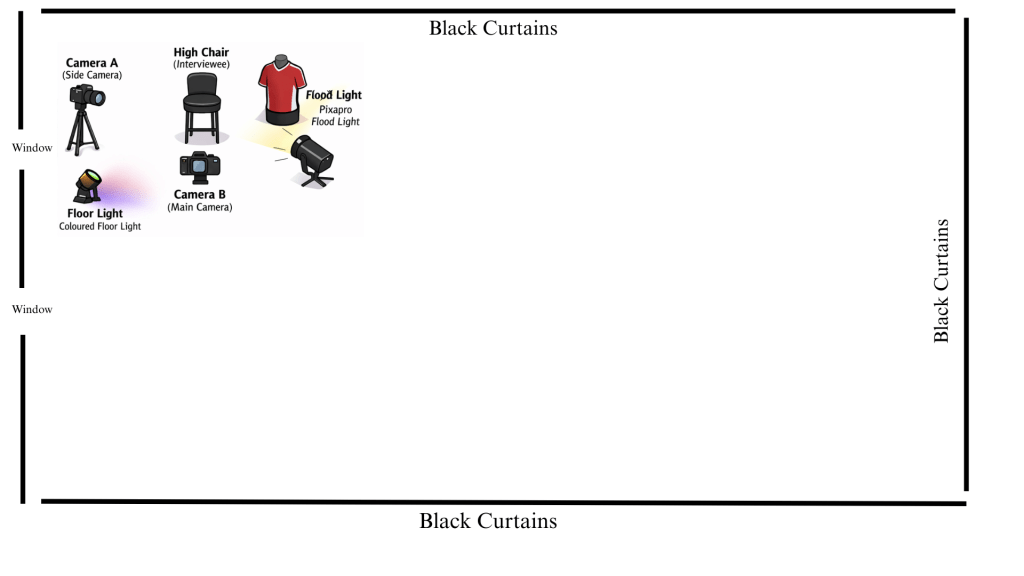
In my floor plans, here and here I try to accuractley display the shots and the type of angles I want to aim for. Hence for labelling my cameras as such.

The M-Cam (wide shot) effectively establishes the relationship between the interviewer and interviewee within the dressed environment. It contextualises the conversation and showcases the set design.

The R-Cam (close-up) captures emotional detail and subtle facial expressions. This makes the interview feel more personal and immersive, allowing the audience to connect with the subject.

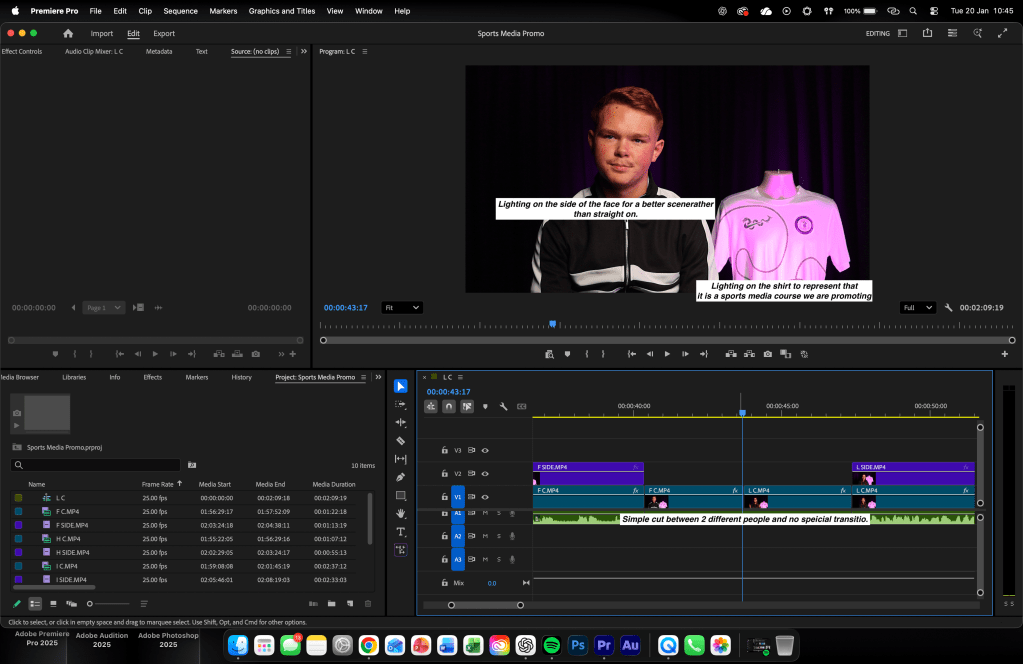
Colour grading and lighting are consistent between both cameras. The match prevents jarring transitions and maintains professional continuity.


All of the uploaded edits of the multi cam videos and everything else mentioned will be here

Week 15 – Setting up a shoot

Context

For this shoot it is near exactly what we planned to interview a sporting indvidual, specifically a boxer. We wanted to target this to a an audience with a male skew aimed towards 15 – 35. Specficically we wanted to focus on the 4 essentials of filming being framing, lighting, scene selection and audio.

We wanted to base it around the 2 camera shoot shown below. We are platforming this on Youtube and will be at the bottom of this.

Research

Story

For this video, we aimed to keep the concept simple while still incorporating strong detail. We focused heavily on the set design, ensuring it was visually engaging and purposeful rather than distracting. Our goal was to gain a deeper insight into what windsurfing truly involves and to communicate that clearly to the audience.

We also wanted to develop our set design skills by making better use of the background, using the space creatively instead of relying on a plain black backdrop.

Stylistic

I wanted to again base this shoot off the Rio Ferdinand interview with Micheal Owen as it is a 3 camera shoot of the interviewee, a wide shot and the interviewer. It was very simply made with some props in behind and made for a good set. The link is below.

Technical

My equipment consists of using the rode wireless microphines, they are very user friendly and easy to use and are still high quality industry standard material. With my visual shoots I used the Canon R50S and that was the best for this use as it is simple to use and is still very user friendly.

Practical Skills

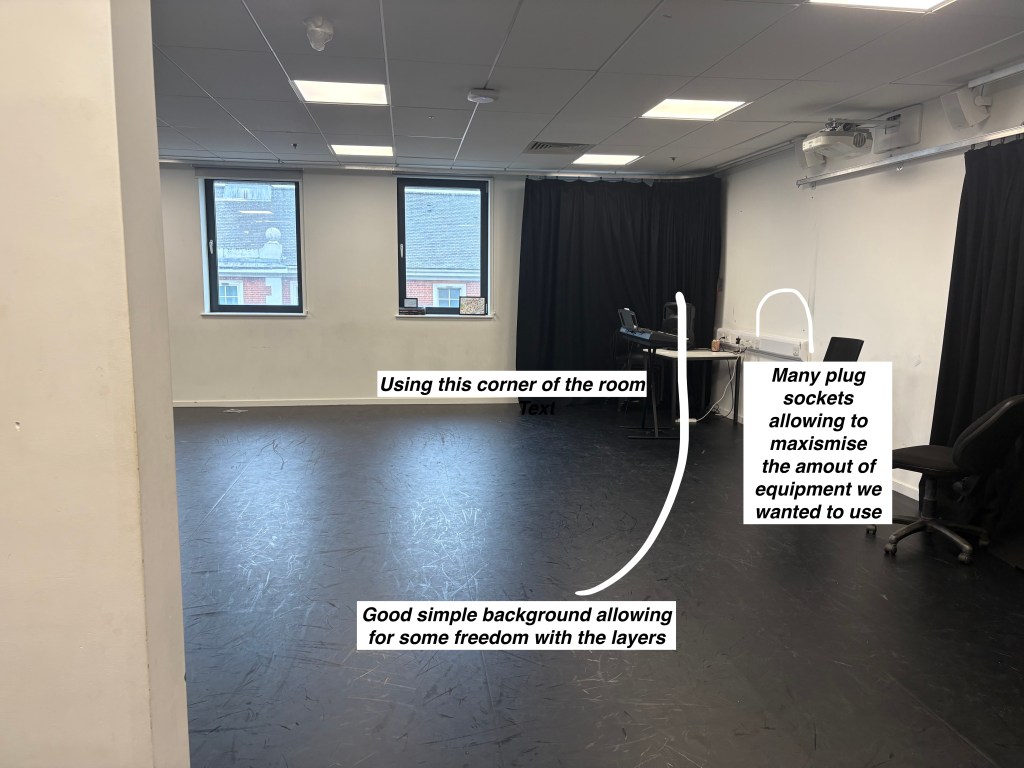
First, I created a mock-up of the room by designing a floor plan and taking photos of the space to help me visualise how I wanted it to look. This allowed me to plan effectively while keeping a clear vision of the final product in mind. I also ensured that the four essentials were incorporated into the setup.

All screenshots are shown below.

WWW (What Went Well)

1. The planning translated well into the final shoot.

The final outcome closely matched what we originally planned. The two-camera setup worked effectively and allowed us to capture both strong mid-shots and wider framing, which made the interview visually engaging while maintaining professionalism.

2. The four essentials were successfully applied.

Framing, lighting, scene selection and audio were clearly considered throughout the shoot. The use of Rode wireless microphones ensured clear and crisp audio, and the lighting setup helped separate the subject from the background, giving the video a more polished and industry-style feel.

3. Set design was more purposeful and visually engaging.

Instead of relying on a plain black background, we used the environment creatively to enhance the scene. This made the interview feel more authentic and aligned with the sporting theme, improving overall production value.

EBI (Even Better If)

1. More in-depth research could have strengthened stylistic decisions.

Although we based the shoot on the Rio Ferdinand and Michael Owen interview format, we could have analysed it further — particularly in terms of pacing, shot variation and lighting ratios — to replicate the professional feel even more closely.

2. More dynamic camera variation could have improved engagement.

While the two-camera setup worked well, adding an additional angle or incorporating subtle movement (such as a slider shot) could have elevated the visual interest and made the final product feel even more high-end.

3. Stronger audience alignment in presentation style.

Although the target audience was clearly identified (male, 15–35), we could have adjusted questioning style or energy slightly to better reflect the tone and expectations of a YouTube-based sporting audience.

Week 14 – Planning second Interview


Context

Within this week we planned our second interview recording session. We wanted this interview to be simple and still entertaining and insightful. Relating to our sports media course we wanted to have a sports related interview as to why we have planned to talk to a Olympic wind surfer. We aimed to target an audience with no gender skew however a large age range from 10 – 30.

We planned by, creating a floor plan of our recoerding area, Created a mock setup and took recce pictures, conducted a risk assesment and detailed potential questions.

Research

Story

For this video we wanted to maintain simplicity and yet have detail. Focusing on the set itself and making it interesting. We are aiming to gain an insight as to what wind surfing actually is and etc. We also wanted to improve on our set design skills using the background to our advantage rather than have a plan black background.

Stylistic

Once again I did take a lot of inspiration from the set of the Rio Ferdinand interview with Micheal owen as they had great depth with their bckground, good prop selection and an all round comfortable interesting long form interview.

Practical skills

First I began creating a mockup of the room I was using floor plan and taking pictures of the room to guage an idea of what I wanted to make making sure to have an idea of my final product always in mind. And also making sure to include the 4 essentials

All screenshots are shown below.

Technical

All of the planning was made on the my latptop making it very easy and simple to do. Recee shots were taken on an Iphone as well.

Evaluation and Reflection

What Went Well (WWW)

  • Clear planning and organisation The planning for the interview was detailed and well-structured. Creating a floor plan, mock setup, recce photos, risk assessment, and planned questions helped ensure the recording session ran smoothly and efficiently. This showed strong preparation and awareness of production requirements.

  • Strong understanding of audience and content The decision to interview an Olympic wind surfer linked well to the sports media course and targeted a broad audience aged 10–30 with no gender skew. The topic choice was engaging and educational, helping to inform viewers who may not be familiar with windsurfing.

  • Effective use of research and stylistic inspiration Taking inspiration from the Rio Ferdinand and Michael Owen interview was effective, particularly in terms of background depth, prop placement, and creating a comfortable long-form interview feel. This research directly influenced the creative direction and improved the overall visual quality of the set.

Even Better If (EBI)

  • More detailed research into the interview subject The project could be improved by including deeper research into windsurfing and the athlete’s background. This would allow for more insightful and varied questions, helping to create a stronger narrative and more engaging interview.

  • Further development of set design experimentation While the set design was improved compared to previous work, it could be enhanced further by experimenting with different lighting setups, colour schemes, or props to add more visual interest and better reflect the theme of windsurfing.

  • Improved technical documentation and clarity The technical section could be expanded by clearly explaining camera settings, lighting choices, and audio setup. This would show a stronger understanding of technical decision-making and how it contributed to the final outcome

Week 13 – Interview Recording


Context

This week we planned, recorded and edited an interview style video to promote our sports media course, our planning consisted of finding a good room to yuse to make sure our 4 essentials from last week were being used, creating a floor plan and creating a mock setup of our recording session. Along with that our recording consited of making sure our room was ready for our use. And while editing I looked to create a storyline, taking 3-4 students within the course and asking simple questions to promote the course. In the edit I chose not to include the questions being said rather have the interviewee speak aloud kind of a repition of the question. I wanted to aim this project towards young adults with a short age range around 15-17 years old as that is the year group in year 12 we are looking to promote for. With no gender skew and editing/sports enjoyers as well.

Research

Story

For this video I wanted to tell a story of wanting to promote the course to a far extent by reaching my target audience by adding humour during the video and making sure that within the edit there were fast and easy cuts. I also added questions that were not necessarily complicated so the viewer can understand a broad basis of the course.

Stylistic

Stylistically I was largley inspired by the micheal own interview with rio ferdinand oin the ballondor linked below. It represtents the different camera angles I wanted to introduce within my video, however I wanted to go different by limiting myself to only one person in the camera rather than having 2 people like they did. This allowed for a far more straight forward approach to maintian simplicity within the video.

Practical skills

First I began creating a mockup of the room I was using floor plan and taking pictures of the room to guage an idea of what I wanted to make making sure to have an idea of my final product always in mind. And also making sure to include the 4 essentials

Then in post production after recording using my floor plan to make the set etc. I edited in premier pro keeping everything simple. Cutting out the questions and having the interviewee identifying to the viewer what was the question being asked.

All annotated screenshots are shown below.

Technical

The technical aspect included the cameras used which were 2 Canons E0S R50s propped up on 2 tripods as well. Coupled with a PixaPro floodlight and also the 3 floor lights displaying the purple lighting in frame. Everything was editied in Adobe Premier Pro for the video aspect and the audio was edited on Adobe Auditon to make it sound as clear as possible. Along side this was all done on my Macbook M2 Pro.

Evaluation and Reflection

What Went Well (WWW)

The planning process was thorough and effective, including a floor plan, mock setup, and careful room selection, which ensured the four essentials were consistently applied during recording

The editing choices were purposeful, particularly removing the interviewer’s questions and allowing interviewees to naturally repeat or imply them, creating a smooth storyline that flowed well for the target audience.

Strong technical awareness was demonstrated through the use of multiple cameras, controlled lighting, and separate audio editing in Adobe Audition, resulting in clear visuals and professional sound quality.

Even Better If (EBI)

It wouldve been better to take at least 3 or more takes to have more choice with the editing.

Make sure to include the clapping in the video rather than audio only to make syncing up the audio much easier.

Makking sure to take more time making the video as it felt rushed near the end etc.

FINAL EDIT SHOWN BELOW

Week 12 – Starting Unit 6


Context

Here we began unit 6 being visual content, beginning to learn the basics of recording video and the 4 essentials that must be had in any video which are, a good scene selection, good audio, good framing and good lighting as well. This being I recorded an educational yet entertaining video aimed towards a younger age group around 12 – 30 with no gender skewed towards it to explain the 4 essentials.

The video was to be kept simple and no special effects just simple cuts and such. This in turn layed out the foundations for a simple, easy to digest video.

This video is shown at the bottom of the weekly log.

Research

Story

For this video I wanted to teach production skills in a way that felt visual, practical, and easy to understand. Rather than to explain each technincal term in detail which would edge away from the main topic at hand boring the viewer. I wanted to include the following:

• A poor example

• An improved version

• A short explanation of why the second version is more effective

I researched different videos that focus on the main topic I was talking about and I found that:

• keeping explanations concise

• intentionally demonstrating mistakes

• showing immediate improvements

Show for a clean, concise yet informative video.

Stylistic

Stylistically, I was insipired by a video that I saw including the 4 different essentials that I have spoken about along with the style of the video, maintaining the fast paced vibe and keeping it entertaining while also keeping it informative.

Practical skills

I used Adobe Premiere Pro to edit the video, with simple fast cuts. Making sure the order of each video was correct making sure to include as I have stated before, a bad example and a good example of one of the essentials.

All screenshots are annotated and shown below.

Technical

The technical aspect included me editing the video using premeier pro as my preferred editing software. Everything was recorded on a Iphone 16 Pro to maintain simplicity as well. I also used my Macbook M2 Pro to edit all of the footage on there as well.

Evaluation and Reflection

What Went Well (WWW)

The structure of the video was clear and easy to follow, with poor examples shown first and improvements immediately after, helping viewers quickly understand the learning points.

The use of visual demonstrations rather than long explanations kept the tutorial engaging and accessible for a wide audience.

Research into popular tutorial creators informed the approach, showing strong awareness of industry standards and audience expectations.

Even Better If (EBI)

Even better if the conclusion included a short recap or takeaway section to reinforce what viewers should remember and apply.

Even better if the video included brief on-screen text or captions to reinforce key points for visual learners.

Even better if a wider range of examples was used to show how the techniques apply in different production scenarios.

Week 11 – The documentary roundup

Context

In this week I will be detailing the process of creating both of the documentaries. Again I aimed both documentaries to target them all at around 15 – 30 years old individuals no matter what gender, I also aimed them to target people who did have an interest in sports. The main idea of the documentary was purley just to make sure I create an informative documentary yet with good sound design to maintain the listeners ear and keep them entertained throughout the entire documentaries.

Research

Story

For this documentary I wanted to inform and entertain, I did this by making sure in both documentaries. One question was answered.

How can I maintain interest through 10 mins of talking?

I was able to do that by finding out that the general public of sports fans are generally interested in the back doors of the sports industry, how did the rise of basketball come about? How did it fall and come back all within years? Also along with the price to watch football I wanted to look at problwms football watching fans may have just like, why do they have to pay so much just to watch the game?

The Revival of British Basketball

For this one I started with how I could tell the story, from what angle. So I started looking at teams to tell the story from and the London Lions stuck out as I already had media accreditation there so I could gather an insight and within east london was the copper box arena that played a large influence towards the revival of british basketball.

From this I looked at the rise of the lions looking at their record breaking first game in 2013 all the way to where they are now. And as the Lions rose so did the british basketball scene as a whole. So using the Lipns as a lens to look through while telling the revival of the sport in britian was a good choice to make.

The Price to Watch Football.

In this documentary, I wanted to aim to tell an untold sotry within sport, something that is not loooked at enough or paid enough attentnion towards. And that was how much it costs to watch football in 2025. The idea I wanted to go towards with was effectivley inclducing case studies of different problems the sport has had within the tv distrubution rights. Looking at the tv rights deal problems in Ligue 1 coupled with having to now watch the Champions league on 2 different applications. All the way to the MLS putting their entire legaue behind apple tv and still bringing low quality.

Taking a generic problem and making sure it is given a problem and its spoken about on a platform online proved to be useful as I was able to craft a good story from it.

Stylistic

Stylistically, I was inspired by The Boot Room podcast, especially their episode The Story of Nike in Football again. Again I wanted to imitate their conversational informative style coupled with adding in relevant clips/interviews with figures within the industry.

Also their “Sports Science in the 1980s” proved to be useful in terms of telling the background of different things as well

Practical skills

Throughout the entire time I strengthened my long-form storytelling and multitrack editing skills inside Adobe Audition.

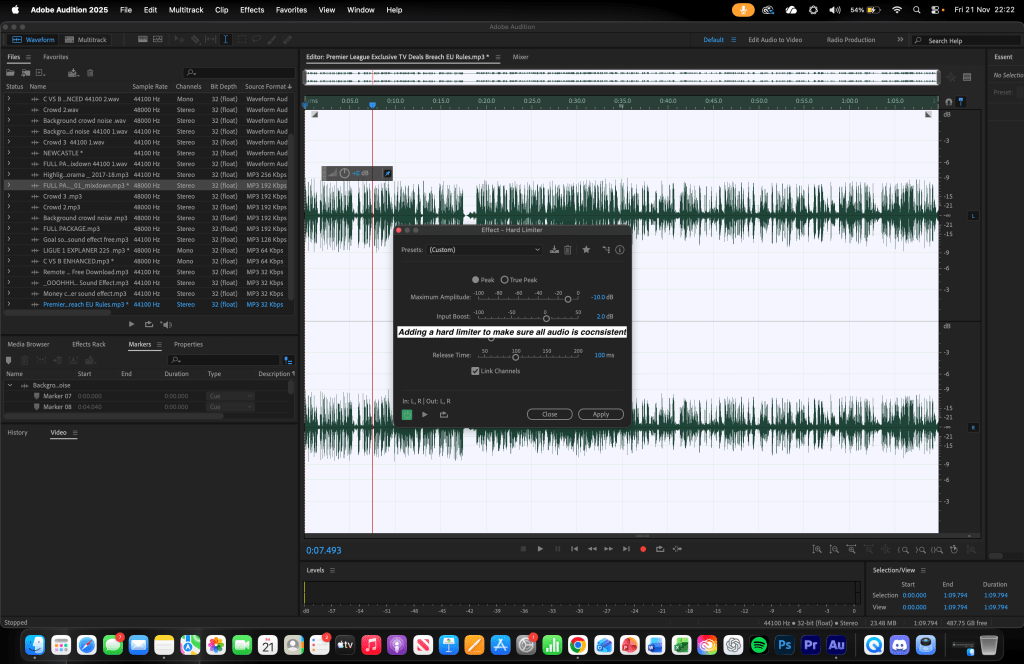
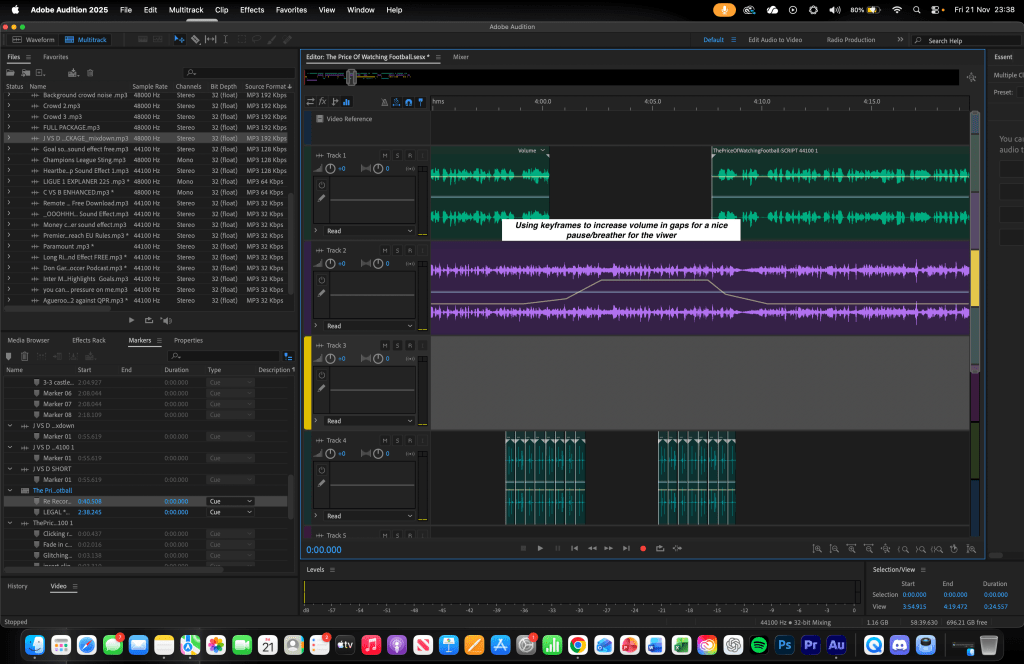
I organised my session using stepping to keep different layers of audio clearly separated, and used bricking to tidy up the final section of the timeline so everything hit its cue points. I added and labelled markers throughout the waveform to plan where interviews, SFX and music beds would enter or fade, which made it easier to jump back and fix mistakes or re-record certain lines.

I applied a Classic Soft Knee dynamics preset and used a Hard Limiter. I trimmed breaths, long pauses and repeated words as well.

All screenshots are annotated and shown below.

Technical

For this project, I used Adobe Audition as my main editing software to record, mix and finalise the documentary. My voiceover was recorded on an Audio-Technica microphone in a sound-treated room to ensure clean, consistent audio without background noise. I used Audition’s multitrack view to layer narration, interviews, SFX and music beds, applying fades, volume automation and panning where necessary to create a balanced stereo image. All recording, editing and exporting were completed on my MacBook Pro M2, which allowed smooth playback even with multiple high-quality audio tracks. I exported a final mastered version suitable for streaming platforms.

Evaluation and Reflection

WWW (What Went Well)

Strong Narritive Structure

It was a great peice to work on as the subject I chose was interesting and unique.

Improved Vocal Quality

Using dynamics processing and a hard limiter gave my narration a professional, broadcast-ready sound. My levels stayed consistent across the full 8 minutes, even when moving between quieter reflective moments and high-energy sections.

Much Better Pacing

Making many revisions to the project in 3 different mixdowns recieving feedback from my teacher and peers to have a great final product

EBI (Even Better If)

Time Taken


Many basic mistakes were made during this project hence it took longer to produce.

Week 10 -Second Audio Documentary


Context

This week I used Adobe Audition to create another audio documentary titled The Price to Watch Football. My target audience was again 15–30 year olds with a male orientated skew with a great football interest. Also I aimed to target my audience who ejoy listenting to long form audio cotnent to inform them and maintain interest within it. The main goal was to create an informative audio documentary detailing the issues with tv rights deals within the football media industry and how it can kill bank accounts by how much needs to be spent to watch the game.

Research

Story

Again I for this documentary I set out to answer a question

Why is football tv rights pie divided into so many small slices and who is it affecting?

To do this I researched statistics and examples of many different examples of this. Such as the TV rights disaster within the French league which almost caused the same league to fall into disaster, I also looked at the TV mountain that the premier league has been able to pick up however relying on it too much could cause major problems and finally looking at the MLS who keep there league behind a paywall with apple which lowers there viewer engagement as less people will choose to play to watch the MLS.

I also gathered factual context and quotes from interviews and reportage so I could back up my points with reliable information rather than just opinion.

Stylistic

Stylistically, I was inspired by The Boot Room podcast, especially their episode The Story of Nike in Football again. Again I wanted to imitate their conversational informative style coupled with adding in relevant clips/interviews with figures within the industry. Within the documentary I also expermentied with a radio channell change sound effect to identify the transition onto a new subject for the listener which allowed for great sound desiging with SFX by layering them.

Practical Skills

This week, I strengthened my long-form storytelling and multitrack editing skills inside Adobe Audition. I organised my session using stepping to keep different layers of audio clearly separated, and used bricking to tidy up the final section of the timeline so everything hit its cue points. I added and labelled markers throughout the waveform to plan where interviews, SFX and music beds would enter or fade, which made it easier to jump back and fix mistakes or re-record certain lines.

I applied a Classic Soft Knee dynamics preset and used a Hard Limiter. I trimmed breaths, long pauses and repeated words as well.

I then layered elements such as the crowd nosiethe radio transition sound [switching radio stations]  under key story beats and subject changes to emphasise momentum and create mini-climaxes. Finally, I made several revisions based on feedback from my tutor and peers, exporting different versions and going back into the multitrack to fix missed edits and volume inconsistencies.

Technical

Technical

For this project, I used Adobe Audition as my main editing software to record, mix and finalise the documentary. My voiceover was recorded on an Audio-Technica microphone in a sound-treated room to ensure clean, consistent audio without background noise. I used Audition’s multitrack view to layer narration, interviews, SFX and music beds, applying fades, volume automation and panning where necessary to create a balanced stereo image. All recording, editing and exporting were completed on my MacBook Pro M2, which allowed smooth playback even with multiple high-quality audio tracks. I exported a final mastered version suitable for streaming platforms and potential award submissions.

Evaluation and Reflection

What Went Well (WWW)

Strong narrative structure

It was a great peice to work on as the subject I chose was interesting and unique.

Many attempts

Making many revisions to the project in 3 different mixdowns recieving feedback from my teacher and peers to have a great final product

Better Pacing

In comparison to the other documentary my pacing and diction was far better than the other one.

Even Better If (EBI)

Time Taken

Many basic mistakes were made during this project hence it took longer to produce.

In first revision commentary used under main narration

Commentary was used underneath my first narration and this caused my voice to be battling with the commentators voice not alloing for clear diction.

Further polish automation and transitions

Use more keyframes etc to refine the audio to and even more polished final project

Below is a link to my final product:

Week 9 – Audio Documentary

Context

This week I used Adobe Audition to create an 8-minute audio documentary called The Revival of British Basketball. My target audience was a 15–30 year old, any gender audience with an interest in sport and long-form storytelling, particularly people who enjoy learning more about the culture and business behind sport. My aim was to make an informative but still entertaining documentary that mixed key historical and modern facts about British basketball with engaging storytelling, emotional peaks and clear narrative “climaxes” to keep listeners hooked throughout.

Research

Story

I set out to answer a clear question:

how and why is British basketball having a revival?

To do this I researched the rise, dip and resurgence of the sport in the UK, looking at factors such as the role of the BBL, the London Lions’ recent success, investment in grassroots basketball, and how British players are starting to appear more in European and NBA conversations.

I also gathered factual context and quotes from interviews and reportage so I could back up my points with reliable information rather than just opinion. My script was structured in chapters early popularity, decline, turning points and modern revival so that the audience could follow a clear journey from past to present.

Stylistic

Stylistically, I was inspired by The Boot Room podcast, especially their episode The Story of Nike in Football. I wanted to mirror their balance of conversational tone and detailed storytelling: using scene setting descriptions, key turning points and well-chosen clip moments to build towards emotional climaxes. I also tried to copy their use of beds and SFX to create atmosphere for example, using crowd noise, shoe squeaks and ball-bouncing to place the listener “courtside”, then dropping the bed under more reflective or emotional sections to let the script breathe.

Practical Skills

This week, I strengthened my long-form storytelling and multitrack editing skills inside Adobe Audition. I organised my session using stepping to keep different layers of audio clearly separated, and used bricking to tidy up the final section of the timeline so everything hit its cue points. I added and labelled markers throughout the waveform to plan where interviews, SFX and music beds would enter or fade, which made it easier to jump back and fix mistakes or re-record certain lines.

I started with applying a Classic Soft Knee dynamics preset, and then used a Hard Limiter. I carefully trimmed breaths, long pauses and repeated words.

I then layered elements such as shoe squeaks, dribbling sounds and crowd eruptions under key story beats to emphasise momentum and create mini-climaxes. Finally, I made several revisions based on feedback from my tutor and peers, exporting different versions and going back into the multitrack to fix missed edits and volume inconsistencies.

Technical

Technical

For this project, I used Adobe Audition as my main editing software to record, mix and finalise the documentary. My voiceover was recorded on an Audio-Technica microphone in a sound-treated room to ensure clean, consistent audio without background noise. I used Audition’s multitrack view to layer narration, interviews, SFX and music beds, applying fades, volume automation and panning where necessary to create a balanced stereo image. All recording, editing and exporting were completed on my MacBook Pro M2, which allowed smooth playback even with multiple high-quality audio tracks. I exported a final mastered version suitable for streaming platforms and potential award submissions.

Evaluation and Reflection

What Went Well (WWW)

Strong narrative structure and clear audience focus

I built the documentary around a clear timeline of British basketball’s rise, decline and revival, which made the story easy to follow and relevant for 15–30 year-old listeners who might be new to the sport but interested in wider sports culture.

Effective use of sound design and layering

The stepping and bricking methods, combined with layered SFX like shoe squeaks, ball bounces and crowd eruptions, helped create atmosphere and drive the emotional peaks of the documentary.

Improved vocal quality and consistency

Using dynamics processing and a hard limiter gave my narration a professional, broadcast-ready sound. My levels stayed consistent across the full 8 minutes, even when moving between quieter reflective moments and high-energy sections.

Even Better If (EBI)

Refine pacing and breathing across the full 8 minutes

My pacing could still be slightly fast. Slowing down in key moments and leaving more intentional pauses would help certain facts and emotional beats land more powerfully.

Increase variety in contributors and perspectives

Including an even wider range of voices. For example, more fans, coaches or grassroots organisers would deepen the sense of “revival” and give the listener a more personal connection with the documenatary

Further polish automation and transitions

I could spend more time fine-tuning volume automation on SFX and music beds so every transition feels completely seamless, especially when moving into and out of interview clips or big climactic moments.

Below is a link to my final product: