
Context
During this week we began with learning basic video editing highlights for football matches, understanding the importance of following a style guide and applying basic edits. We layed it out as a kick off, goals and full time style in the edit. We also wanted to aim this towards people aged 15-35 with a male skew towards it, making sure to maintain fast paced gameplay and yet maintaing the story of each moment in the match. The match we edited was a single camera game with the U21 Manchester United VS Barnsley in the 23/24 season .
Research
Story
For this we wanted to include all notable moments in the game being the kickoff, all the goals and the full time whistle. This is too maintain an entertaining watch for the view featuring all of the crowd noise and celebrations too to entertain.
Stylistic
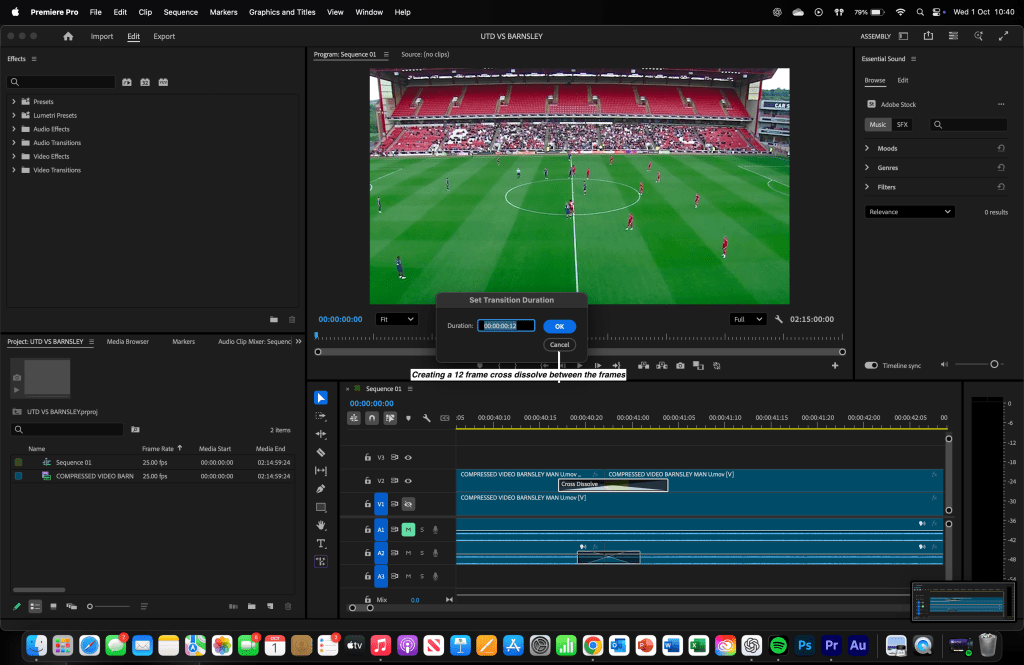
We wanted to create a short fast paced edit with short and sharp cuts following the style guide making sure to include a 12 frame cross dissolve between each replay. We wanted to match the idea of some channels like the Official Sky Sports Premier League channel.
Technical
I researched various hardware options suitable for audio editing in Adobe Audition. I currently use a MacBook Pro M2, which provides more than enough power to run the software effectively. For the software itself, I chose Adobe Premier Pro over alternatives because it allows me to take simple ideas and develop them into polished, high quality video edits.
Practical Skills
We learned the basic skills on premier pro understanding how to make a 12 frame cross dissolve to create an engaging seamless transition between each of the goals and such. Ensuring to include the crowd noise and celebrations to make sure it is even more entertaining.


Evaluation and Reflection
What Went Well (WWW)
- Being able to edit the highlights in quick succession.
- Understanding the 12 frame cross dissolve efficiently and applying it to the edit.
- Maintaining a clear structure (kickoff, goals and full time.)
Even Better If (EBI)
- More variety in camera angles – Using additional camera shots would have made the highlights more dynamic and visually interesting.
- Quick Succession – Completing the edit more faster than before.
- Refinement of transitions – Possibly smoother or more creative transitions could enhance the overall polish of the edit.
Below is all of the platformed videos
 Imad Daili - Sports Media