Week 8 – Sport Roundup

Context

This week we used Adobe Audition creating sport audio packages typically around all different types of entertaining sports. I aimed to create a weekly sport roundup package with engaging information relevant to the listener at the time having the most interesting/popular sport/fixture first and ending with the least popular, I aimed to target this project to a male audience aged 16-40 who have an interest in a variety sport.


Research

Story

I aimed to tell the simple to digest facts of the sport I would be talking about, making sure to add in a clip from a coach/manager/player from the relevant peice I was talking about. This is to make sure that I was telling a engaging fast paced, easy to understand package that lasted 1-1:30 mins long.

Stylistic

I set out to produce a TalkSport-style audio package that included a fast-paced 90-second match-fix roundup. Keeping my script short, sharp and purposeful helped maintain a professional tone and ensured the audio flowed smoothly. Below is an idea of what I was trying to go for.

Practical skills

This week, I continued to develop my efficiency in Adobe Audition, focusing on structuring and delivering a short-form sports audio package to a broadcast-ready standard.

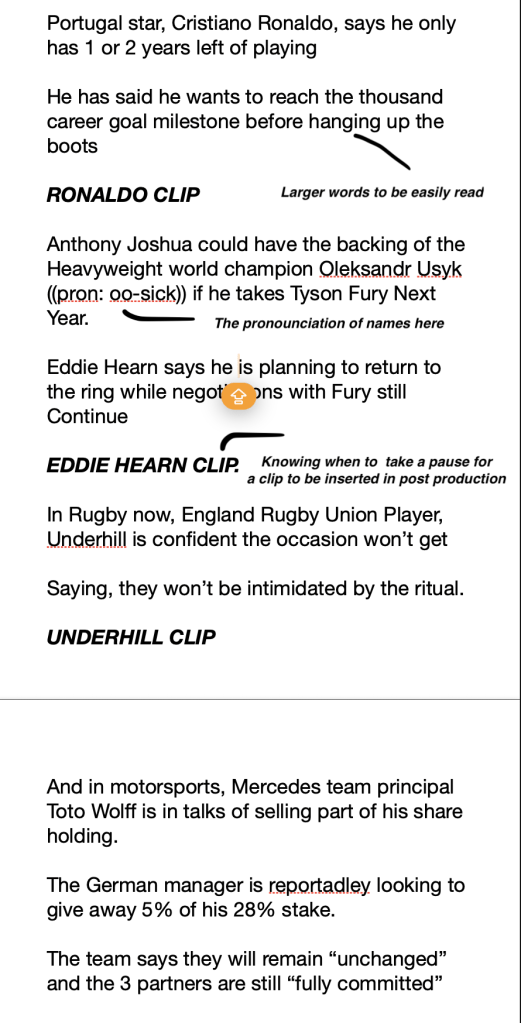
I refined my pacing and diction so the full script fit sounded neat and tidy while still capturing the important moments. I also used editorial judgment to prioritise the most important audio peices (long pauses, uneccacary words) giving major games more depth and summarising matches concisely.

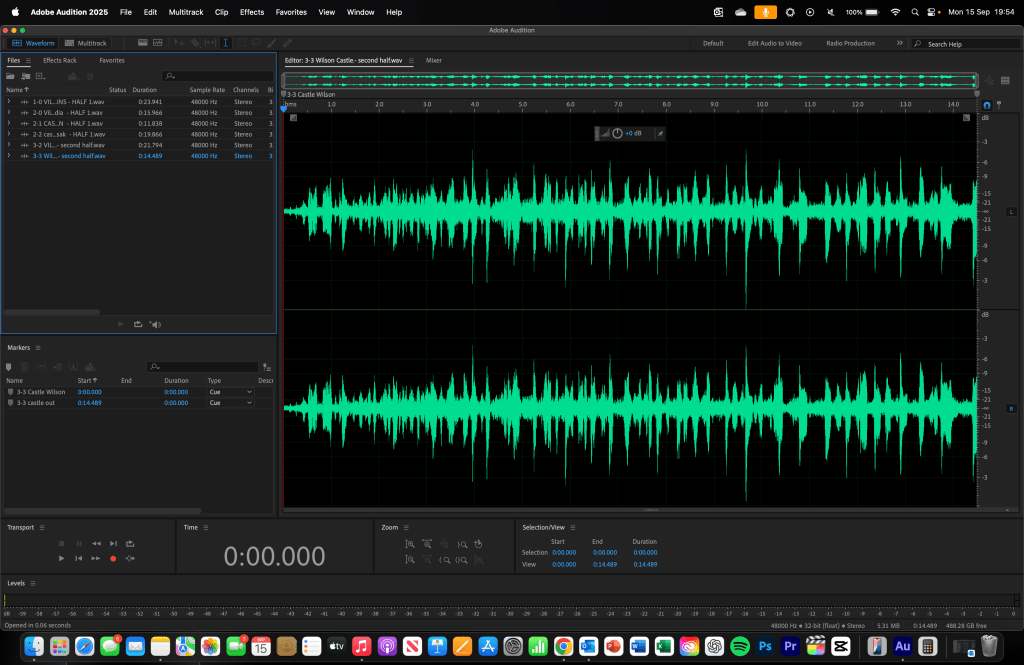
Below I have included an annoted screenshots of one of my scripts and what it looks like:
Technical

For this project, I used Adobe Audition as my main editing software to record, mix, and finalise my package. The software allowed me to layer my voiceover, apply fades, and manage levels with precision. I recorded my voice using an Audio-Technica microphone inside an already sound-treated radio studio, ensuring clean and consistent broadcast quality audio. All editing and exports were completed on a MacBook Pro M2, which provided smooth playback and reliable rendering when finalising both the dry and bedded versions of the package.

Evaluation and Reflection

What Went Well (WWW)

1. Clear editorial structure and audience focus
You organised your sports roundup logically, starting with the most popular fixtures and ending with the least, which kept the package relevant and engaging for your target male 16–40 audience.

2. Strong delivery and pacing
Your pacing, diction and scriptwriting were refined, allowing you to deliver sharp, well-timed commentary that fit naturally into the 90-second TalkSport-style format.

3. Time Taken
I was able to mkae this along with others in quick succession. Being already skilled at VO and Audition Editing.

Even Better If (EBI)

1. Pacing and Delivery
Pacing could be better as at times I was told I was speaking too fast and not clearly enough, My diction could use work as well as some words were mispronounced leading them to be unclear.

2. Broaden story diversity
I could include a wider mix of sports or more international fixtures to appeal to a slightly broader audience and keep the roundup feeling fresh each week.

3. Further refine clip integration
Experimenting more with timing, EQ, or automation on manager/player/coach clips could make them blend even more seamlessly with my voiceover and improve overall cohesion.

Below is a link to my final product

Week 7 – Basic Football Package


Context

This week we came back to adobe audition creating basic football packages, I aimed to create a champions league match day highlight package detailing all of the relevant information within it, This time I aimed to target this project to a male skew with people aged 16-40 with a great interest in watching the champions league rather than standard priemer league games.

The source material is attached below:


Research

Story

The story I aimed to encapture was to detail efficently a rundown of the most recent champions league games to effectivley detail the scoreline and important events, such as Trent Alexander Arnold returing to anfield and being met with boos. I also aimed to order the importance of the games by making sure I talk about the biggest game first which was, Liverpool vs Real Madrid, then going forward to talk about smaller games. This matched up with my fast paced enganging script to the target audience I was aiming for.

Stylistic

I aimed to create a proffesional 90 second match fix which encaptured all of the important games in a succint manner that allowed to be easily understandable by many. Creating my own script from the games allowed me to be creative with the words and remain proffessional. Below I have attached the final product with a Bed which was already unedited by somebody else, and another is a dry version, with no bed, by me with my own writing etc.

Practical Skills

This week, I further developed my ability to work efficiently in Adobe Audition, focusing on structuring and delivering a short-form audio sports package to a broadcast standard. I practiced scripting and voicing sports highlights with clarity and energy, ensuring my tone matched the enthusiasm of Champions League coverage. This also helped refine my pacing and diction to fit the 90-second limit without losing key information. I applied editorial judgment when deciding which stories to prioritise, ensuring the biggest fixtures received more coverage while smaller matches were summarised effectively. This exercise strengthened my ability to write for the ear, adapting written material into engaging spoken content suitable for my target audience of 16–40-year-old male football fans.

Technical

For this project, I used Adobe Audition as the main editing software to record, mix and finalise my Champions League highlight package. The software allowed me to layer my voiceover, apply fades, and manage levels with precision. I recorded my voice using a RØDE NT1-A condenser microphone connected through a Focusrite Scarlett audio interface, which provided a clean, professional sound quality ideal for broadcast. Headphones were used throughout to monitor levels and ensure there was no clipping or background noise. All editing and exports were completed on a Macbook pro M2 ensuring smooth playback and reliable rendering when finalising both the dry and bedded versions of the package.

Evaluation and Reflection

What Went Well (WWW)

  • Professional script and delivery – My narration sounded confident, clear, and well-paced, matching the tone of official Champions League coverage.
  • Prioritising key stories – Starting with Liverpool vs Real Madrid created a strong opening and kept the rundown engaging and relevant.
  • Use of Adobe Audition tools – I efficiently used fades, normalisation, and level balancing to ensure the mix was clean and consistent. Such as using the hard limiter to limit the peaks and lows and the classic soft knee

Even Better If (EBI)

  • Include more production elements – Adding subtle crowd noise or stingers between matches could make the segment feel more dynamic.
  • Adjust EQ and compression – Fine tuning these settings would help the voiceover sit even more naturally over the music bed.
  • Refine vocal tone variation – Experimenting with energy and emphasis could make the delivery sound more like live radio presentation.

Week 6 – Adding my own Commentary

Context

This week we continued working with Adobe Premiere Pro, but also incorporated Adobe Audition to combine video and audio editing skills. For this week’s project, I worked on creating a “spoof” version of the Athletico Madrid vs Real Madrid highlights. The goal was to add my own commentary over the clips while maintaining professional presentation standards and ensuring the flow of the match remained engaging. The target audience remained male-skewed, aged 14–40, and the focus was on telling a clear story of kickoff, goals, notable moments, and full time with replays.

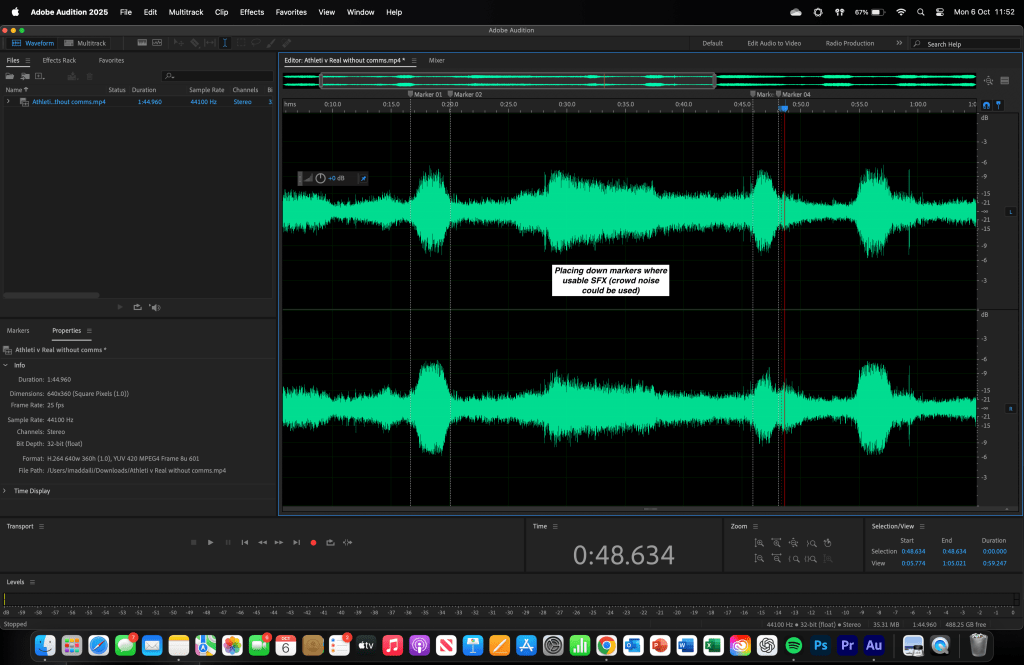
The source material included the original Premier Sports edit and additional live feed clips without commentary shown below.


Research

Story

The story I aimed to tell this week involved recreating the narrative of the game while adding my own commentary over the original footage. I ensured the key moments kickoff, goals, and full time were highlighted clearly. While maintaining the quality “spoof” effect. I carefully layered my commentary to match the timing of the game, making sure to avoid cutting off any natural audio from the original footage unnecessarily, and added crowd noise in sections to maintain atmosphere and blend in commentary seamlessley.

Stylistic

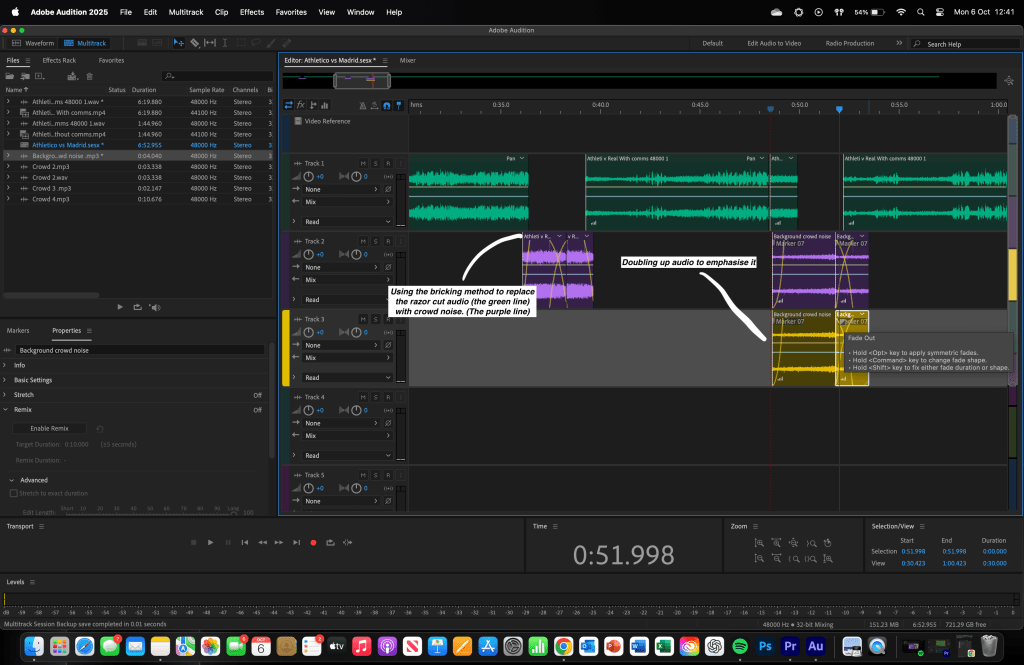
The style I aimed for this week was a professional commentary session. I focused on delivering commentary in a clear and energetic manner while maintaining a natural flow that aligned with the match. By adding in my own commentary from the original with my own lines, I was able to craft a coherent, entertaining edit that kept viewers engaged. Crowd noise was added strategically to maintain realism, which is shown in the screenshots below, and the pacing of my delivery was matched to the intensity of the game. The overall goal was to produce an edit that was entertaining, polished, and easy to follow, while showing creative flair.


Technical

This week, I explored the use of a lip microphone to record my own commentary, which allowed for clearer, more professional audio capture. I continued using Adobe Premiere Pro for video editing and Adobe Audition for audio layering and enhancements. Using the lip mic, I was able to record clean voiceovers directly into Audition, reducing background noise and improving clarity. My MacBook Pro M2 handled the combined workload efficiently, allowing me to switch between multitrack audio editing and video timeline work without lag.


Practical Skills

Several tools in Adobe Audition and Premiere Pro were used to achieve the final edit:

  • Razor Tool & Markers – I used the razor tool to cut sections of the original commentary and place my spoof lines precisely. Markers helped identify key moments for my comedic insertions and crowd noise.
  • Multitrack Sessions – I layered my commentary with multiple crowd noise tracks, using fade-ins and fade-outs to make the transitions smoother and maintain a dynamic atmosphere.
  • Lip Microphone Recording – Recording directly with a lip mic ensured clear, professional commentary and allowed for better timing alignment with the video clips.
  • Layering & Volume Control – I adjusted volume levels across tracks to balance the original crowd noise with my own commentary, keeping the overall mix clear and engaging.

Evaluation and Reflection

What Went Well (WWW)

  • Effective recording with lip microphone – My commentary came through clearly, making the spoof more professional and engaging.
  • Layering of audio – Combining crowd noise, original commentary, and my voiceover resulted in a clean and immersive final edit.
  • Timing and placement of spoof lines – Using markers ensured my commentary matched the action on-screen perfectly.

Even Better If (EBI)

  • Apply EQ and compression – This would have helped balance my commentary with existing crowd noise and original audio more effectively.
  • Use automation for volume control – Adding keyframes could enhance certain comedic moments or game highlights for stronger impact.
  • Time management – Spending slightly more time refining transitions and layering could make the final edit even smoother.
  • Experiment with additional sound effects – Incorporating subtle SFX could further enhance the comedic effect of the spoof.

Weekly Log 5 – Understanding Premier Pro

Context

This week we continued still with premier pro however this time combining the 2 adobe applications, being premier pro and adobe audition. For this weeks project we worked on re-editing the highlights of Athletico Madrid vs Real Madrid made by premier football. We were going to rework the audio as the commentators voice kept on getting faded out along with unnecessary comments as well. We wanted to aim this piece to a male skewed audience with a age range of 14-40, to tell a story of kickoff, goals and full time with replays in between. We aimed to replicate professional sports media presentation standards coupled with expanding our knowledge as well developing our skills in this field.

The source material was the original Priemer Sports edit and another live feed replay with no comms.


Research

Story

The story I wanted to tell was to simply have kickoff, goals along with replays and full time as well, coupled with different notable moments in the game too. We altered the audio of the edit and not the video adding in crowd noise within the cuts that I made. I wanted to make it similar to a much higher quality video edit by taking ideas from the video shown below making sure not to fade any words but only crowd noise when changing clips.


Stylistic

The editing style I aimed to achieve focused on maintaining clarity and professionalism throughout the final video. I ensured that no words from the commentator were cut off or faded out prematurely, preserving the natural flow and rhythm of the match commentary. This helped maintain viewer engagement and ensured that the narrative of the game remained coherent from start to finish. Additionally, any unnecessary or irrelevant remarks made during the recording were carefully removed and replaced with authentic crowd noise to maintain continuity and atmosphere. The overall goal was to produce a clean, seamless, and easy-to-follow highlight package that reflected professional broadcast standards while keeping the focus on the key moments of the match.

Technical

I explored different hardware options for audio editing in Adobe Audition and found that my current MacBook Pro M2 offers more than enough power to run the software smoothly. For video editing, I decided to use Adobe Premiere Pro instead of other programs, as it enables me to transform simple ideas into professional, high quality edits.


Practical Skills

We made use of several tools in Adobe Audition, but the ones we relied on most were the razor tool and marker placements. The razor tool allowed me to precisely cut sections of audio, removing unwanted commentary while keeping the natural flow of the match intact. Markers were used to identify key points where sound effects (SFX) such as crowd noise could be added, helping to enhance the realism of the edit.

I also worked in a multitrack session to layer different audio clips, including multiple crowd noise tracks. By doubling up and using fade-ins and fade-outs, I was able to create smoother transitions and build intensity where needed. These techniques ensured the final edit sounded clean, dynamic, and engaging perfectly matching the energetic tone expected by the target audience.


Evaluation and Reflection

What Went Well (WWW)

  • Effective use of the razor tool – I accurately cut out unnecessary commentary sections without disrupting the flow of the audio, maintaining a smooth and professional edit.
  • Layering and blending of crowd noise – By doubling up and fading crowd sound effects, I successfully created a realistic and immersive atmosphere that matched the energy of the footage.
  • Strategic use of markers – Placing markers to identify points where additional sound effects could be added helped me stay organised and made the editing process more efficient.

Even Better If (EBI)

  • Use different FX in audition – Things like EQ and compression could been used as this would have helped balance levels between commentary and crowd noise, ensuring a more polished final mix. And any others.
  • Used automation correctly for control – Using automation by adding keyframes I could make subtle volume adjustments that could make certain moments stand out more clearly and improve overall clarity.
  • Improving the speed of the edit – Managing my time more efficiently to create a higher quality edit in much shorter time.

Below is all of the platformed videos

Weekly Log 4 – Premier Pro Video Highlights

Context

During this week we began with learning basic video editing highlights for football matches, understanding the importance of following a style guide and applying basic edits. We layed it out as a kick off, goals and full time style in the edit. We also wanted to aim this towards people aged 15-35 with a male skew towards it, making sure to maintain fast paced gameplay and yet maintaing the story of each moment in the match. The match we edited was a single camera game with the U21 Manchester United VS Barnsley in the 23/24 season .


Research

Story

For this we wanted to include all notable moments in the game being the kickoff, all the goals and the full time whistle. This is too maintain an entertaining watch for the view featuring all of the crowd noise and celebrations too to entertain.

Stylistic

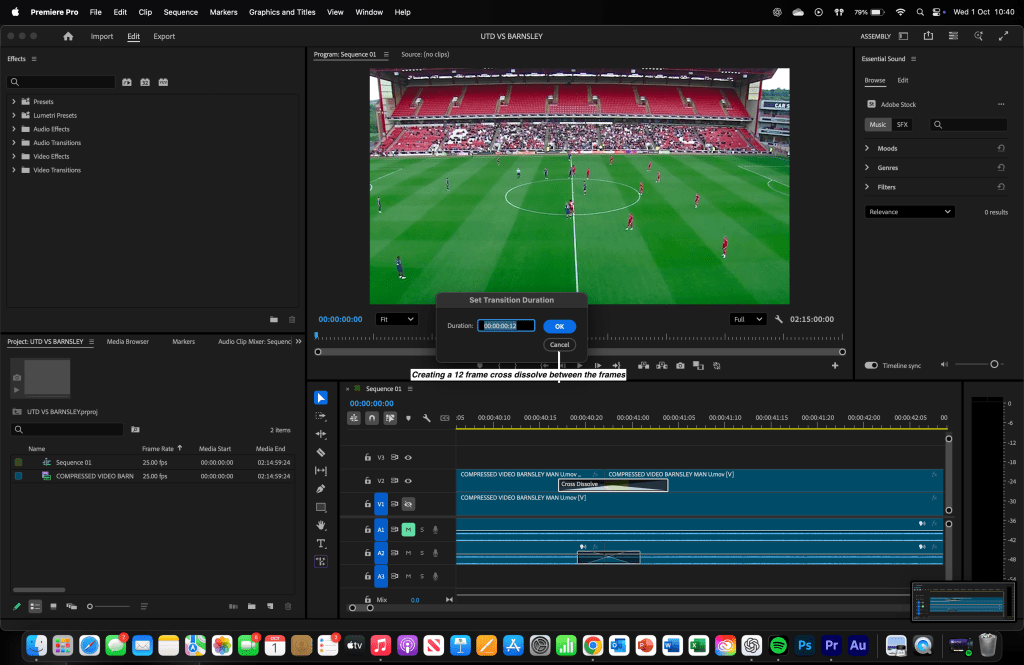
We wanted to create a short fast paced edit with short and sharp cuts following the style guide making sure to include a 12 frame cross dissolve between each replay. We wanted to match the idea of some channels like the Official Sky Sports Premier League channel.

Technical
I researched various hardware options suitable for audio editing in Adobe Audition. I currently use a MacBook Pro M2, which provides more than enough power to run the software effectively. For the software itself, I chose Adobe Premier Pro over alternatives because it allows me to take simple ideas and develop them into polished, high quality video edits.


Practical Skills

We learned the basic skills on premier pro understanding how to make a 12 frame cross dissolve to create an engaging seamless transition between each of the goals and such. Ensuring to include the crowd noise and celebrations to make sure it is even more entertaining.


Evaluation and Reflection

What Went Well (WWW)

  • Being able to edit the highlights in quick succession.
  • Understanding the 12 frame cross dissolve efficiently and applying it to the edit.
  • Maintaining a clear structure (kickoff, goals and full time.)

Even Better If (EBI)

  • More variety in camera angles – Using additional camera shots would have made the highlights more dynamic and visually interesting.
  • Quick Succession – Completing the edit more faster than before.
  • Refinement of transitions – Possibly smoother or more creative transitions could enhance the overall polish of the edit.

Below is all of the platformed videos


Weekly Log 3 – Understanding Audition

Context

During this week we focused on the same concept of creating highlights packages for people aged 15-45 with a male skew towards it showing the kickoff, goals and full time. I worked on the Chelsea vs Brighton pre season game and I also worked on my speed with some champions league games like Juventus against Dortmund.

We also had a Classic FM day and for this we created a 2-3:30 long highlights package featuring the best pieces of commentary from the champions league. with classical music in the background tailored for people aged around, 35-50 again with a male skew and for people to listen to classical music.


Research

Story

Again I wanted to represent the interesting moments in the game being the kickoff, goals and full time whistle. This is all because it would become an engaging story for the viewer to engage with and gage a full picture of the game without having to watch the entire match.

For the Classic FM day, featuring all of the most entertaining pieces of commentary, The story I wanted to tell was more to engage the listener and for them to be entertained by the champions league music and the commentary coupled with showing all of the most notable moments from the Champions League match week 1 .


Stylistic

The style I wanted to create for this highlight package was to be short and sharp and only feature goals within it and to be around 2-3 mins long. Typically channels like the Official Sky Sports Premier League channel. More similar to the 4-4 Juventus vs Dortmund game shown below from TNT sports.

What I wanted to create for the classic FM highlight reel was to feature the match week 1 story and also represent the most notable moments of commentary from there. This can be shown here. Or with the video below.


Technical

I researched different pieces of hardware that were suitable for audio editing on Adobe Audition. I have access to a Macbook Pro M2 which is more than enough for adobe audition. In terms of software I used audition in comparison to others as it allows to build on basic ideas and to develop them into great audio clips.


Practical Skills


We made use of several tools in Audition, but the ones we relied on most were the fade-in and fade-out features. These allowed us to create a seamless final package that flowed smoothly and kept the audio engaging for listeners. This directly tied into our target audience, as it helped us produce a fast-paced, captivating highlight reel. In addition, I worked in a multitrack session to incorporate and edit the music, ensuring it fit perfectly with the overall piece.


Evaluation and Reflection

What Went Well (WWW)

  • Being able to edit the highlights in quick succession.
  • Utilising the remix tool instead of looping the music manually.
  • Overlapping 2 pieces of commentary over each other to create a seamless package.

Even Better If (EBI)

  • It would’ve been better if I made the Classic FM highlight package more quickly with more quality.
  • It would’ve been better to save all of my individual packages as a MP3 to save space on my laptop.
  • It would’ve been easier to shorten down the commentary length in some places to only tell the main story of the goal.

Below is the platformed audio clips

Weekly Log 2 – Adobe Audition

Context

This week I began creating a highlight package of a kickoff, goals and full time for a friendly premier league game in the 23/24 season with Newcastle UTD vs Aston Villa in a preseason tournament. I wanted to target this piece towards peopled aged 15 – 45 with a thorough interest in football with a male skew towards it. We created this highlight package on adobe audition using different tools that it has to offer. With a final product to platform it on Spotify for creators.


Research

Story

The story I wanted to tell was to be similar to a highlight package made by the premier league for example: here. Featuring all notable moments in the game typically, kick off, goals and the full time whistle. This is because it will create and engaging story for the viewer for them to have an interest in.


Stylistic

The style I wanted to create for this highlight package was to be short and sharp and only feature goals within it and to be around 2-3 mins long. Typically channels like the Offical Sky Sports Premier League channel. More similar to this video shown below:


Technical

I researched different pieces of hardware that were suitable for audio editing on Adobe Audition. I have access to a Macbook Pro M2 which is more than enough for adobe audition. In terms of software I used audition in comparison to others as it allows to build on basic ideas and to develop them into great audio clips.


What

The research I conducted for my age range was firstly finding out that making a very fast paced highlight package was imperative to keep the younger generation engaged whilst also understanding to understanding to balance it out with enough information to keep an older generation engaged. We researched the specific match that was played and gathered all the accurate information available to us. Alongside this, we studied different editing styles used in official Premier League highlight packages to better understand the elements that make an audio highlight package sound professional. Furthermore, we fully researched different audio editing tools such as, Logic pro x (which is more tailored towards music editing) and adobe audition which is the one that we used. We used Audition as it allows to understand the basics and to build on them with more complex features.


Why

This research allowed us to develop practical editing skills, such as using the fade in and fade out tools within the favourites tab. It also deepened our understanding of why audio only highlight packages are created. We learned that a commentator can effectively capture the story of a goal within a short 15-second clip, making the entire match concise and engaging to listen to.


Practical Skills

We used different tools in audition that we had at our disposal however the one we used the most was most definitely the fade out and fade in tools making sure the final package became a seamless audio file that became engaging for people to listen too. Which linked too the target audience we wanted to target as it assists to create a engaging fast pace highlight reel. I also used a multitrack session to add in and edit the music that we could use as well.


Evaluation and Reflection

What Went Well (WWW)

  • It became easy to understand where and how to find the kick off and all the goals that happened during the game.
  • It was easy to understand how to make a seamless package that was engaging for the listener.
  • Looping specific parts of the music was a good idea as the most impactful moments were coupled with impactful music too.

Even Better If (EBI)

  • It would’ve been even better if I made the package more complicated by adding in different things that happened during the game to fully en-capture the entire story of the match.
  • It could’ve been even better to blend the audio files in even more with the music to get everything 100% aligned.
  • Creating the edit in a shorter amount of time with the same amount if not more quality.

Below is the final platformed product shown.

Weekly log 1 – Word Press

Context

During this week I have been busy creating my wordpress website adding different features making sure to showcase my previous work and anything else I am working on, along with my final major project (FMP.) Adding different pages for example this weekly log and making it a blog post page. I also wanted to bear in mind that I wanted to target an audience for this website of people as likeminded as me tailoring my website directly towards the media industry.


Research

Technical

We explored a range of website hosting platforms to find the most suitable place to showcase our work. After comparing different options, we chose WordPress because it is user-friendly, highly flexible, and does not restrict creativity. It allowed us to build and customise our site freely, without running into issues around copyright or usage limitations.

Stylistic

Our goal was to create a professional and accessible platform where our projects could be presented clearly and effectively. WordPress gave us the freedom to design and manage our content in a way that reflected our vision, while also offering reliability, scalability, and a strong support community. This made it the best choice for ensuring our work reaches the widest possible audience.


Practical Skills

WordPress was a difficult website to use however getting the grasp of it became simpler over time and easier to understand. I utilised many different tools the website has to offer. The one I used the most was most definitely adding a video using a YouTube link which organised everything and made it much more neater.

Furthermore, making sure the pages were hyperlinked with the buttons was also a skill I had to learn as well, I also began to add all of the menus etc.


Evaluation and Reflection

What Went Well (WWW)

  • Successfully creating a presentable portfolio page.
  • Understanding how to present the website as a whole in a neat and orderly manner
  • Adding videos and images correctly and in the main point.

Even Better If (EBI)

  • Could be better if I was able to hyperlink the weekly log page to make it more presentable.
  • Making sure to understand the full capability of how the menus work and how to organise them effectively.
  • Ensuring I utilise more complex blocks that will make a more engaging website rather than a wall of words.

Introduction – Imad Daili

In this section of the website I will be detailing every aspect of my process of different works I do. Such as my upcoming FMP in year 12 and any other tasks or personal endeavours I could take up.

In every single weekly log I create I will follow 4 main criteria being: Context, Research, Practical Skills, Evaluation and reflection. In all of these sub-sections I will be detailing my reasoning and such for my work.

If you would like to know more about me click here, alternatively if you would like to contact me in any way and find out more about what I have done and how I did it, click here.