
Context
This week we continued still with premier pro however this time combining the 2 adobe applications, being premier pro and adobe audition. For this weeks project we worked on re-editing the highlights of Athletico Madrid vs Real Madrid made by premier football. We were going to rework the audio as the commentators voice kept on getting faded out along with unnecessary comments as well. We wanted to aim this piece to a male skewed audience with a age range of 14-40, to tell a story of kickoff, goals and full time with replays in between. We aimed to replicate professional sports media presentation standards coupled with expanding our knowledge as well developing our skills in this field.
The source material was the original Priemer Sports edit and another live feed replay with no comms.
Research
Story
The story I wanted to tell was to simply have kickoff, goals along with replays and full time as well, coupled with different notable moments in the game too. We altered the audio of the edit and not the video adding in crowd noise within the cuts that I made. I wanted to make it similar to a much higher quality video edit by taking ideas from the video shown below making sure not to fade any words but only crowd noise when changing clips.
Stylistic
The editing style I aimed to achieve focused on maintaining clarity and professionalism throughout the final video. I ensured that no words from the commentator were cut off or faded out prematurely, preserving the natural flow and rhythm of the match commentary. This helped maintain viewer engagement and ensured that the narrative of the game remained coherent from start to finish. Additionally, any unnecessary or irrelevant remarks made during the recording were carefully removed and replaced with authentic crowd noise to maintain continuity and atmosphere. The overall goal was to produce a clean, seamless, and easy-to-follow highlight package that reflected professional broadcast standards while keeping the focus on the key moments of the match.
Technical
I explored different hardware options for audio editing in Adobe Audition and found that my current MacBook Pro M2 offers more than enough power to run the software smoothly. For video editing, I decided to use Adobe Premiere Pro instead of other programs, as it enables me to transform simple ideas into professional, high quality edits.
Practical Skills
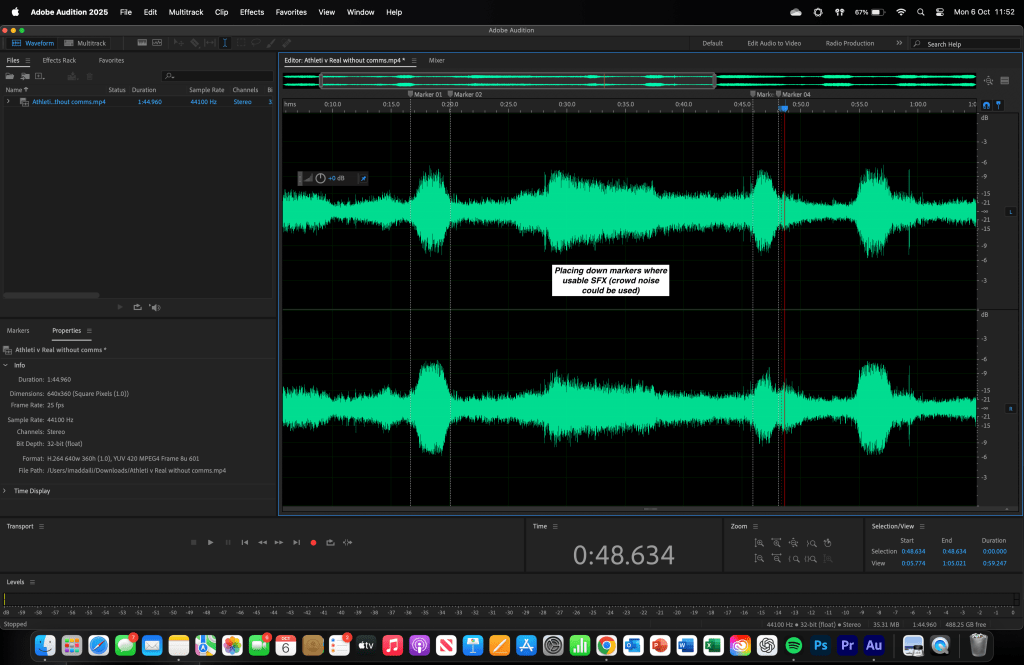
We made use of several tools in Adobe Audition, but the ones we relied on most were the razor tool and marker placements. The razor tool allowed me to precisely cut sections of audio, removing unwanted commentary while keeping the natural flow of the match intact. Markers were used to identify key points where sound effects (SFX) such as crowd noise could be added, helping to enhance the realism of the edit.
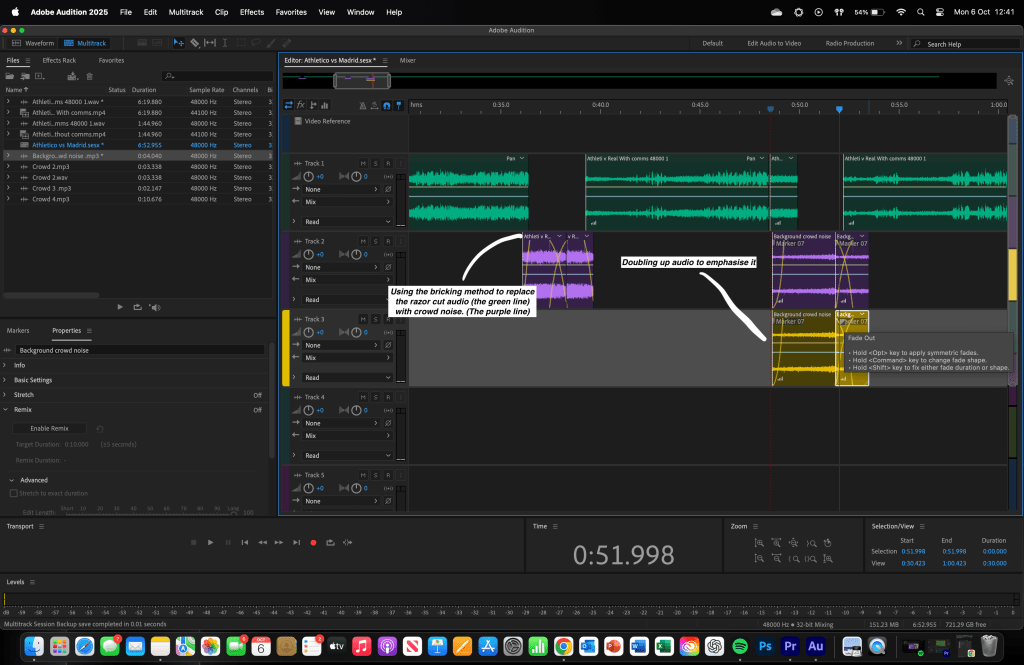
I also worked in a multitrack session to layer different audio clips, including multiple crowd noise tracks. By doubling up and using fade-ins and fade-outs, I was able to create smoother transitions and build intensity where needed. These techniques ensured the final edit sounded clean, dynamic, and engaging perfectly matching the energetic tone expected by the target audience.


Evaluation and Reflection
What Went Well (WWW)
- Effective use of the razor tool – I accurately cut out unnecessary commentary sections without disrupting the flow of the audio, maintaining a smooth and professional edit.
- Layering and blending of crowd noise – By doubling up and fading crowd sound effects, I successfully created a realistic and immersive atmosphere that matched the energy of the footage.
- Strategic use of markers – Placing markers to identify points where additional sound effects could be added helped me stay organised and made the editing process more efficient.
Even Better If (EBI)
- Use different FX in audition – Things like EQ and compression could been used as this would have helped balance levels between commentary and crowd noise, ensuring a more polished final mix. And any others.
- Used automation correctly for control – Using automation by adding keyframes I could make subtle volume adjustments that could make certain moments stand out more clearly and improve overall clarity.
- Improving the speed of the edit – Managing my time more efficiently to create a higher quality edit in much shorter time.
Below is all of the platformed videos

 Imad Daili - Sports Media